In an era where our professional and personal lives are fragmented across dozens of digital platforms, maintaining a cohesive narrative of our experiences has become increasingly difficult. We capture snapshots of our days in task managers, social media feeds, bookmarking tools, and project management boards. Yet, these pieces of data often remain siloed, disconnected from our personal reflections. Today, Day One—the industry-leading digital journaling platform—seeks to solve this fragmentation with the launch of its official integration with Zapier, the world’s most popular automation engine.
This integration marks a significant pivot in the philosophy of personal documentation. By allowing Day One to receive data from over 8,000 third-party applications, the company is transforming the digital journal from a blank canvas into an automated repository of one’s life.
The Core Innovation: Automating the Narrative
The primary objective of the Day One-Zapier integration is to eliminate the friction that often prevents people from journaling consistently. For many, the mental hurdle of sitting down to document the day is exacerbated by the need to recall specific details: "What tasks did I complete?" "What interesting articles did I read?" "What was the core takeaway from that meeting?"

By connecting to Zapier, Day One can now act as a silent, background observer of your digital life. When a trigger event occurs—such as marking a task as complete in Todoist, archiving a post on X (formerly Twitter), or ending a calendar meeting—Zapier can instantly translate that event into a structured entry within a designated Day One journal. This effectively turns the journal into a "second brain" that documents the flow of life without requiring the user to type a single word.
Chronology of Development
The journey toward this integration has been driven by long-standing requests from the Day One power-user community. For years, users have utilized unofficial workarounds and third-party scripts to pipe data into their journals.
- Early 2024: Development teams at Day One prioritized the "connected ecosystem" initiative, identifying Zapier as the most robust partner for broad-spectrum integration.
- Mid-2024: Beta testing commenced with a select group of high-frequency users to refine the API triggers and ensure that the end-to-end encryption protocols remained uncompromised during data ingestion.
- Late 2024: Security audits were finalized to ensure that while data flows into the journal, no data can be pulled out by external parties.
- November 2025: Official global rollout begins for all Day One Premium subscribers, version 2025.23 or higher.
Privacy by Design: The Encryption Standard
The most critical challenge in integrating a third-party automation service with a private, end-to-end encrypted journal is maintaining the integrity of the user’s data. Day One has approached this with a strict "write-only" architecture.

When a user authorizes the connection, they are granting Zapier permission to transmit data into the application. Crucially, the integration is unidirectional. Zapier has no technical capability to read, scan, or export existing journal entries. All data imported via Zapier undergoes the same end-to-end encryption process as manual entries, ensuring that even the developers of the automation platform cannot view the content being archived.
"Our commitment to privacy is non-negotiable," noted a spokesperson for the Day One team. "We designed this system so that Zapier serves as a conduit—a delivery service that drops information into your digital safe. Once that information is inside the vault, the courier has no key to look back inside."
Supporting Data and Use Cases
The versatility of this integration is best demonstrated by the 30+ pre-built templates provided by Day One. These templates act as blueprints for users who want to begin automating their life-logging immediately.

Practical Applications
- The Professional Archive: Automatically create entries for completed tasks in project management tools like Asana or Jira. This provides a "done list" for performance reviews and project retrospectives.
- The Digital Curator: Every time you save an article to Pocket or Instapaper, a copy of the URL, title, and key metadata is sent to a "Reading Log" journal.
- The Social Historian: Archive your own social media posts or replies to keep a personal record of your online presence, independent of the platforms themselves.
- The Meeting Log: Sync your Google or Outlook calendar to create an entry at the end of every meeting, providing a space for instant reflection or notes.
Technical Efficiency
Users can leverage Markdown formatting within these automations. This means that a task from a project management app doesn’t just appear as a string of text; it can be formatted with headers, checkboxes, and links, making the final journal entry clean and readable.
Implications for Personal Productivity and Mindfulness
The shift toward "automated journaling" carries profound implications for how we interact with our own histories. Traditionally, journaling is an act of active reflection. By automating parts of the process, Day One is not attempting to replace reflection, but rather to provide a richer foundation for it.
Reduced Cognitive Load
By offloading the documentation of "what happened" to automation, the user is free to focus on the "why" and "how" during their active, manual journaling time. When a user opens their journal at the end of the day, they are met with a pre-populated timeline of their day’s activities. This serves as a "memory trigger," making it significantly easier to write thoughtful, reflective entries.

A Deeper Historical Record
For those who suffer from the "blank page syndrome," the presence of automated entries provides a scaffold. Seeing a list of completed projects or saved articles provides immediate context, turning a vague sense of a "busy day" into a concrete, measurable record of accomplishment.
How to Get Started: A Step-by-Step Guide
To ensure a smooth transition into this new workflow, the setup process has been streamlined for mobile and web users.
- System Requirements: Ensure you are a Day One Premium subscriber. Update your iPhone, iPad, or Android app to version 2025.23 or higher.
- App Connection: Navigate to the settings within your Day One app and locate the "Integrations" section. Select "Zapier" and follow the prompt to generate an authentication token.
- The Zapier Dashboard: Head to the Zapier website and add "Day One" as a connected application. Use your credentials to link your accounts.
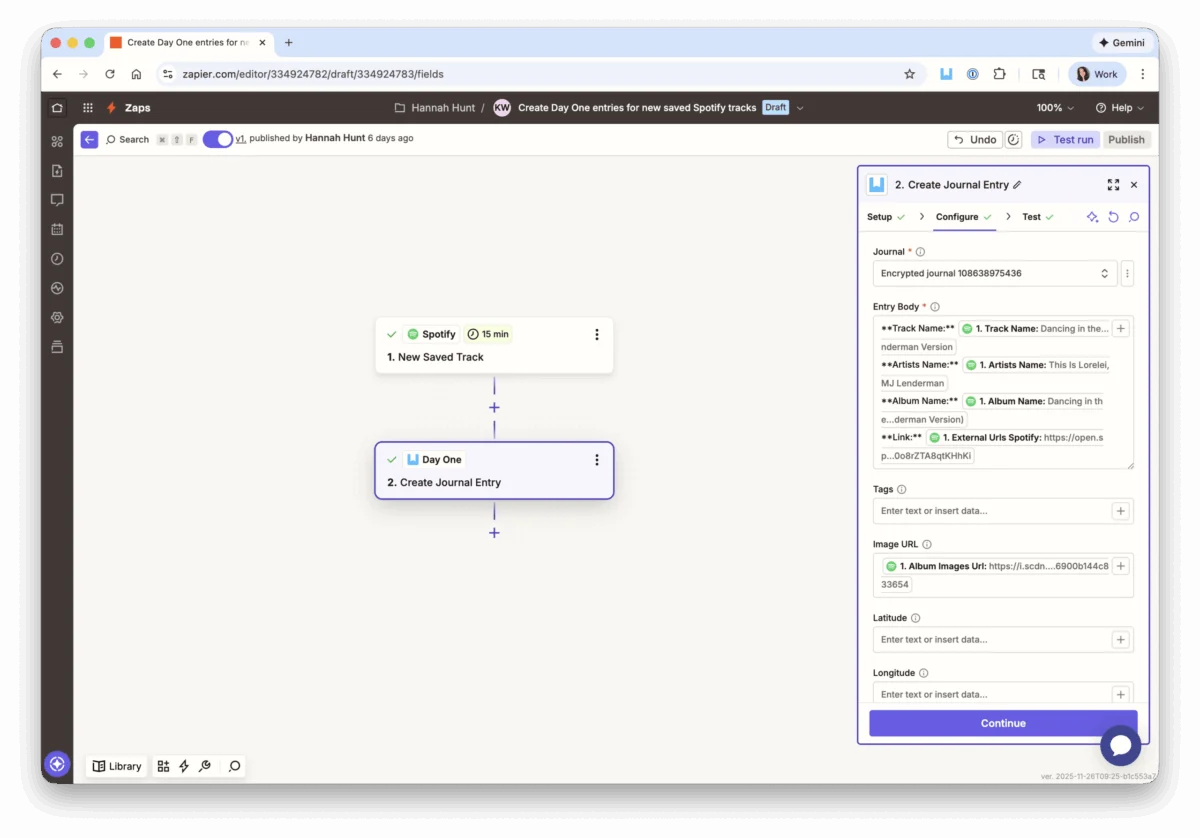
- Deployment: Browse the 30+ pre-built templates. Select a template, map the fields from your source app (e.g., Gmail, Todoist, Slack) to your Day One fields, and activate the "Zap."
Addressing Common Concerns (FAQs)
Despite the clear benefits, users have raised valid questions regarding the mechanics of this integration.

- Will my journal become cluttered? Users maintain total control over which journal receives which automated data. You can direct work-related tasks to a "Work" journal and social media posts to a "Life" journal, keeping your personal reflections pristine and organized.
- What if an automation fails? Zapier provides a robust dashboard for tracking errors. If an entry fails to post, you will receive a notification within the Zapier interface, allowing you to troubleshoot and re-run the process.
- Does this require a paid Zapier plan? While many automations can be built using Zapier’s free tier, high-frequency users or those requiring multi-step workflows may need a paid Zapier subscription.
- Can I disable the link? Absolutely. At any time, you can revoke access via the Day One settings menu or the Zapier "Connected Accounts" dashboard. Access is terminated instantly.
Conclusion: The Future of Digital Memory
The introduction of Zapier integration is more than just a new feature; it is an acknowledgment of the reality of modern life. We live in a digital-first world, and our tools should facilitate the preservation of our experiences, not complicate them. By bridging the gap between our active lives and our reflective spaces, Day One has set a new standard for what a personal journal can be.
As we continue to generate more data than ever before, the ability to synthesize that data into a coherent, private, and permanent record is invaluable. With this update, Day One ensures that while life may move quickly, the memories of it are captured, stored, and protected with minimal effort. Whether you are a project manager tracking milestones or a creative collecting inspiration, this integration provides the structure you need to make your journal a more complete, and more meaningful, reflection of your life.