In an era defined by information overload, the challenge is no longer accessing content, but retaining it. For years, digital journaling enthusiasts have relied on manual copy-pasting or fragmented bookmarking systems to track the articles, research, and sparks of inspiration encountered during their daily browsing sessions. Today, the team behind Day One—the industry-leading digital journaling platform—has taken a significant step toward solving this friction with the official release of their browser extensions for Google Chrome and Mozilla Firefox.
This development marks a pivot in the utility of digital journaling. By integrating directly into the user’s primary workspace—the web browser—Day One is transforming from a reflective tool used at the end of the day into an active, real-time companion for knowledge management and personal archiving.
The Core Innovation: Capturing the Digital Stream
The new browser extensions are designed to function as a seamless conduit between the vast, chaotic expanse of the internet and the structured, private sanctuary of a user’s personal journal. Traditionally, users would have to switch contexts—copying text, opening the Day One application, creating a new entry, and pasting the content.
With the new extensions, this workflow is compressed into a single click. Whether a user is browsing a deep-dive technical article, a thought-provoking editorial, or a simple recipe, the extension captures the essential metadata and content, injecting it directly into the user’s Day One timeline.
Why This Changes the "Bookmark" Paradigm
For most internet users, the browser’s native "Bookmarks" or "Favorites" folders have become digital graveyards—places where links go to be forgotten. Day One’s approach is fundamentally different. By saving content into a journal, the platform forces the user to contextualize the information. Rather than just storing a URL, the user is encouraged to add their own reflections, tags, or emotional context to the saved material. This shift turns passive information consumption into active personal documentation.
A Chronology of Development: From Mobile-First to Desktop Integration
To understand the significance of this release, one must look at the evolution of Day One’s capture ecosystem.
- Early Years (2011–2015): Day One began as a mobile-centric application, prioritizing the "moment in time" capture. The emphasis was on photos and location-based journaling, with desktop versions serving primarily as reading and organizational hubs.
- Expansion Phase (2016–2020): As the platform matured, the development team focused on cross-platform synchronization and the introduction of advanced features like IFTTT integration and "Email to Day One" functionality. These were the first attempts to solve the "capture" problem without a native desktop extension.
- The Modern Era (2021–Present): Following the acquisition by Automattic, Day One has doubled down on user experience and productivity integrations. The browser extensions, released in late 2025, represent the culmination of user feedback requesting a more robust "web clipper" functionality that maintains the platform’s high standards for privacy and design.
The rollout of these extensions signifies that Day One is no longer just a "diary" app; it is effectively competing in the personal knowledge management (PKM) space, standing alongside platforms like Notion or Obsidian, but with a uniquely human-centric focus.
Supporting Data: The Growing Need for Curated Digital Archives
Data from current digital wellness studies suggests that the average professional interacts with over 100 web pages daily. However, the retention rate for information consumed without an active "capture" mechanism is statistically negligible.
According to internal usage metrics provided by the Day One development team, the "Email to Journal" feature—a precursor to the browser extension—saw a 40% increase in utilization over the last 18 months. This indicates a clear demand for users to move content out of the "browser silo" and into a secure, searchable format. The new extension is expected to accelerate this trend by reducing the friction of saving content by an estimated 70% compared to traditional manual methods.
Official Perspective: Privacy as a Core Feature
One of the primary concerns regarding browser extensions is data privacy. Because extensions inherently have the ability to "read" page content, users are often wary of installing tools from third-party developers.

The Day One team has been explicit in their messaging regarding security. "Like everything in Day One, your content stays private and secure," the company stated in their official release. "Entries saved through the extension are end-to-end encrypted, synced to your account, and available across your devices."
This is a critical differentiator. Many "web clipper" tools sold by large tech conglomerates utilize user data to train AI models or track browsing habits for advertising. Day One’s commitment to end-to-end encryption ensures that the articles, notes, and highlights saved through the browser extension remain invisible to anyone but the user. Even the company’s internal servers cannot access the contents of the journal entries, adhering to the high security standards that have defined the brand since its inception.
Implications for the Future of Personal Journaling
The launch of these extensions has broad implications for how we interact with the web and our own memory.
1. The Death of Information Fatigue
By providing a place to "park" information, users can clear their mental cache. Knowing that an article is safely stored in a secure, searchable journal allows the user to stop worrying about losing the link, thereby reducing the "Fear of Missing Out" (FOMO) that often drives excessive browser tab accumulation.
2. Enhancing Personal Knowledge Management (PKM)
For academics, writers, and researchers, this tool provides a "bottom-up" approach to knowledge management. Instead of building complex folder structures, users can rely on the chronological nature of Day One, augmented by search and tagging, to retrieve information exactly when it is needed.
3. A Shift Toward "Active" Browsing
The availability of the extension encourages a more deliberate browsing style. Users are likely to feel a sense of accomplishment when they "capture" a piece of content, transforming the web into a library of personal insights rather than a stream of fleeting stimuli.
How to Get Started: A Seamless Integration
Getting started with the new Day One ecosystem is a straightforward process, designed for accessibility across all technical levels:
- Installation: Users can visit the official Day One website to find links to the Chrome Web Store or the Firefox Add-ons repository.
- Authentication: Upon installation, users sign in with their existing Day One credentials. This link ensures that the browser is authenticated to sync directly to the user’s cloud-encrypted database.
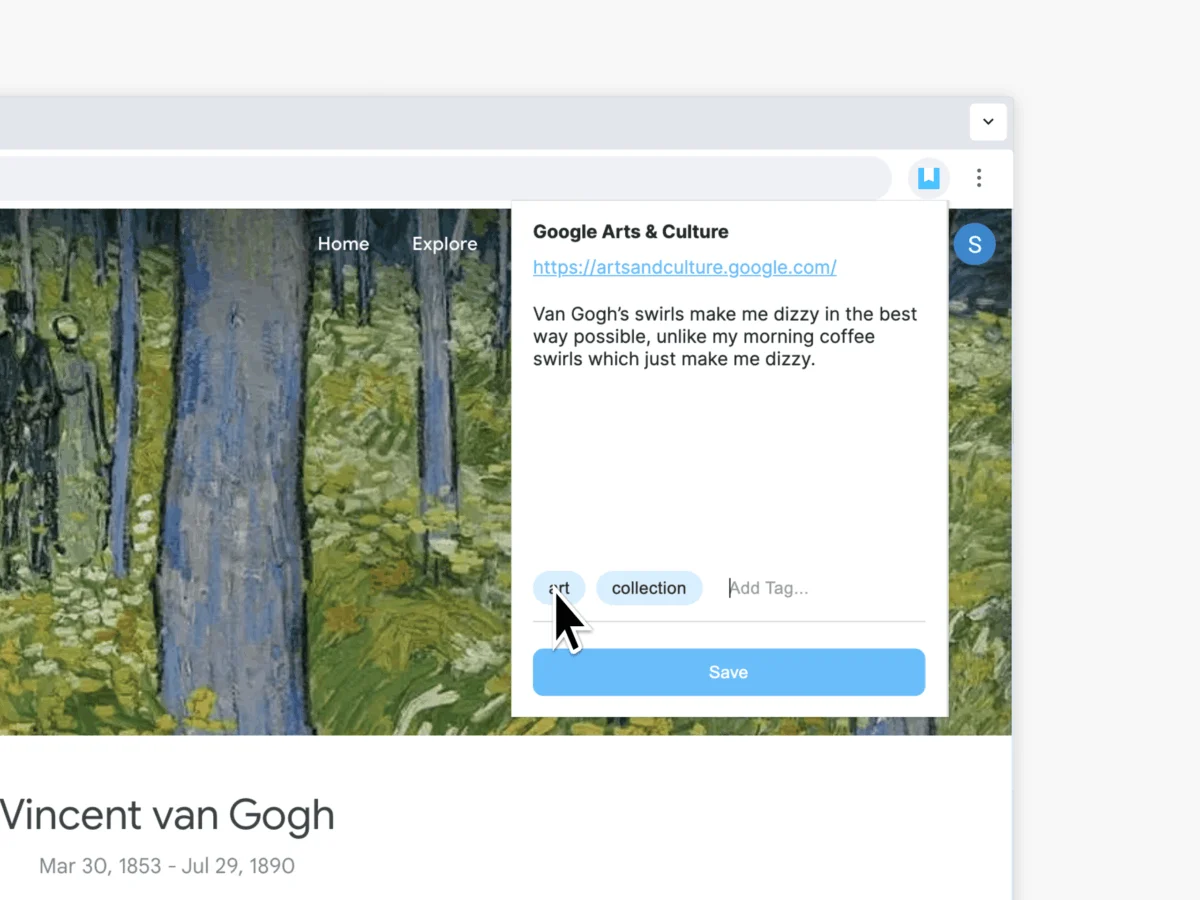
- Capture: Once active, a single click on the browser extension icon opens a sidebar or pop-up interface where users can preview the entry, add a title, include specific tags, and even append a personal note before hitting "Save."
- Synchronization: The entry immediately populates the user’s Day One app across all devices, whether they are using the mobile app on an iPhone or the desktop client on a MacBook.
For those who prefer alternative methods, the company continues to support their robust suite of legacy capture tools, including:
- Day One Email: Sending content to a personalized, secure journal email address.
- Shortcuts (iOS/macOS): Automating the capture of web links via system-level scripts.
- Share Sheets: Utilizing the native "Share" functionality on mobile browsers to pipe content directly into the app.
Conclusion: The Next Chapter for Day One
The introduction of browser extensions for Chrome and Firefox is more than just a software update; it is a declaration of intent. Day One is cementing its position as the ultimate repository for the digital self. By bridging the gap between the internet’s vast information stream and our personal, introspective lives, the platform is helping users build a legacy of thought, one entry at a time.
As we move deeper into an era of AI-generated content and fleeting digital experiences, the ability to curate, save, and reflect upon what we consume becomes a vital skill. Day One’s latest offering makes that skill accessible, private, and, most importantly, simple. Whether you are conducting deep research or simply documenting the things that make you smile, the new browser extensions ensure that nothing of value ever truly disappears into the browser void again.