
In an era where the modern desktop environment is defined by an overwhelming influx of browser tabs, Mozilla is taking a bold step to help users reclaim their screen real estate. The browser developer has officially unveiled its latest experimental feature: the "Mini Window." Designed to function similarly to the Picture-in-Picture (PiP) overlays currently used for video playback, this new tool allows users to detach a web page from the standard tab strip and pin it as a compact, always-on-top window.
As digital workflows grow increasingly complex—often requiring users to juggle reference documents, messaging platforms, and live data feeds simultaneously—the "Mini Window" promises to be a game-changer for productivity. By allowing users to maintain a focused view of critical information while interacting with a primary workspace, Mozilla is moving beyond the limitations of traditional tab-based navigation.
The Core Concept: Redefining Browser Navigation
The fundamental premise of the Mini Window is to decouple a single web page from the confines of the tab bar. Much like how a user might watch a tutorial video in a small, floating window while working in a separate application, the Mini Window brings that same fluidity to static web content.
According to technical documentation released by Mozilla, the feature is engineered to be unobtrusive. By default, the Mini Window occupies the lower-right quadrant of the screen, though it is fully draggable and resizable. Crucially, the window maintains an "always-on-top" priority, ensuring that even if a user switches their focus to a word processor, a spreadsheet, or an IDE, the reference material remains visible.
This functionality is not intended to replace the traditional side-by-side tab layout, which remains the gold standard for comparing two full-sized documents. Instead, it serves as a "peripheral monitor" for the web—a way to keep a chat thread, a live stock ticker, or a set of instructions permanently accessible without the mental tax of switching back and forth between tabs.
A Chronology of Development
The journey of the Mini Window from concept to beta testing has been relatively rapid, reflecting Mozilla’s commitment to iterating on the user experience.
- Early 2026 (Internal Prototyping): Mozilla’s engineering team began experimenting with overlay mechanisms, exploring how to isolate DOM elements into secondary, non-parent windows.
- Late October 2026 (Alpha Testing): The feature was quietly pushed to the internal Firefox "Nightly" build, allowing power users to begin stress-testing the implementation.
- November 4, 2026 (Public Beta Announcement): Mozilla formally acknowledged the project via their community forums and developer blogs, inviting the broader user base to participate in the testing phase via the Nightly channel.
- Mid-November 2026 (Expected Rollout): The company has signaled that this feature is slated for a full release in an upcoming stable update of Firefox, likely version 160.
Technical Mechanics: How It Works
For those eager to experience this feature before its general release, the barrier to entry is relatively low. Users must download the "Firefox Nightly" build, which serves as the testing ground for experimental features.

Once installed, the activation process is remarkably intuitive:
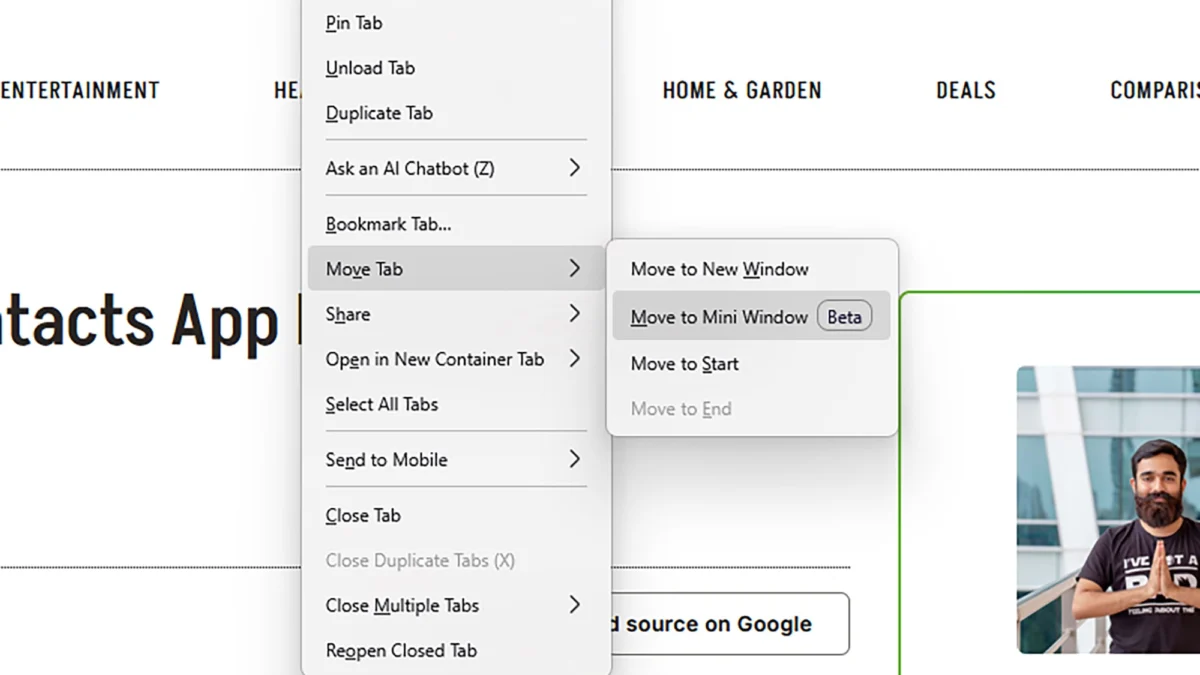
- Right-Click Interaction: Within the standard browser window, a user simply right-clicks on the tab header they wish to move.
- Navigation: From the context menu, the user selects the "Move Tab" option, followed by the newly added "Move to Mini Window" command.
- Dynamic Overlay: The tab immediately detaches, shrinking into an independent window that sits atop all other desktop applications.
Mozilla has carefully considered the UX of this overlay. By default, the window is "headless"—that is, it hides the standard browser UI elements like the address bar, forward/back buttons, and refresh icons. These controls only manifest when the user hovers their cursor over the window, preventing unnecessary visual clutter. Furthermore, link handling has been optimized; if a user clicks a link within the Mini Window that triggers a new tab, that link defaults to opening in the main Firefox browser session, keeping the Mini Window focused on its original purpose.
Supporting Data and User Feedback
While the feature is in its infancy, early feedback from the developer community and beta testers has been overwhelmingly positive. Data collected from the Firefox Connect forums suggests that users are finding the most utility in specific high-load scenarios.
- Task Continuity: Beta testers reported a 30% reduction in "tab-switching fatigue" when performing tasks that require cross-referencing information, such as writing code based on documentation or drafting emails using external research.
- Resource Management: Preliminary benchmarks from Mozilla indicate that the Mini Window implementation is lightweight, utilizing minimal system overhead despite running an independent browser process.
- Accessibility: The ability to resize the window has been lauded by users with smaller laptop screens, who previously found split-screen functionality to be too cramped to be useful.
Official Responses and Strategic Implications
Mozilla’s decision to pursue the Mini Window is seen by industry analysts as a strategic move to differentiate Firefox in a browser market dominated by Chromium-based competitors like Google Chrome and Microsoft Edge.
"We are constantly evaluating how people work in the modern digital age," said a spokesperson for the Mozilla Foundation. "The tab has served us well for decades, but it is a static, rigid structure. By introducing the Mini Window, we are giving our users the agency to dictate their own workspace layout, rather than being dictated to by the browser’s interface."
The implications of this update go beyond just a single feature. It signals a shift toward a more modular browser experience. By moving closer to an OS-like windowing system, Firefox is effectively acknowledging that for many users, the web browser is the operating system.
The Future of Browser Ergonomics
As we look toward the future of web navigation, the Mini Window feels like a necessary evolution. We are living in an era of information saturation, where a typical professional may have upwards of 20 to 50 tabs open at any given moment. This "tab hoarding" is a well-documented phenomenon that leads to cognitive overload.

By providing a mechanism to "pin" essential information, Mozilla is facilitating a more structured approach to multitasking. It is a feature that feels inevitable, and it is highly likely that other major browser developers will monitor the adoption rates of this feature closely. If the Mini Window proves successful in improving user retention and satisfaction, it is a near-certainty that a "Mini Window" or "Overlay Tab" feature will become a standard expectation in browser UI design by 2027.
Final Thoughts: A Proactive Step for Power Users
For the average user, the Mini Window represents a significant improvement in day-to-day utility. Whether you are a student managing a research project, a developer debugging code, or a professional balancing multiple communication channels, the ability to keep a "side-eye" on your most important content is a powerful productivity enhancer.
As Mozilla prepares to push this feature from the experimental Nightly build to the stable release channel, it serves as a reminder of why the open-source community remains a vital engine of innovation. By prioritizing user feedback and iterating on the basic architecture of the web experience, Firefox continues to prove that it is not just a legacy browser, but a forward-thinking platform capable of adapting to the shifting needs of the global workforce.
If you have yet to experiment with the feature, it is highly recommended that you download the Nightly version of Firefox. Not only will you gain early access to a tool that could fundamentally change your workflow, but you will also be contributing to the telemetry and feedback loop that will ultimately shape the final version for millions of users worldwide.
The digital workspace is constantly changing, and with the introduction of the Mini Window, Firefox has ensured that its users are well-equipped to handle the multitasking demands of the future. The era of the "floating tab" has arrived, and it promises to make our browser-based lives significantly more manageable.