For millions of dedicated users, the digital journal has evolved from a simple text-based diary into a sophisticated ecosystem of memory-keeping. Whether it is a travel log documenting a summer abroad, a high-stakes work repository, a curated gratitude practice, or a sensitive parenting diary, the digital notebook has become the primary vessel for human experience in the 21st century.
However, as the scope of our lives expands, so too does our digital footprint. Day One, the industry-leading journaling application, has long been praised for its minimalist interface and robust security. Yet, even the most streamlined design can succumb to the "sidebar sprawl" that plagues power users. Today, Day One addresses this challenge head-on with the introduction of Journal Collections, a feature designed to bring architectural order to the digital shelf without disrupting the sanctity of the writing experience.
The Core Concept: Order Without Complexity
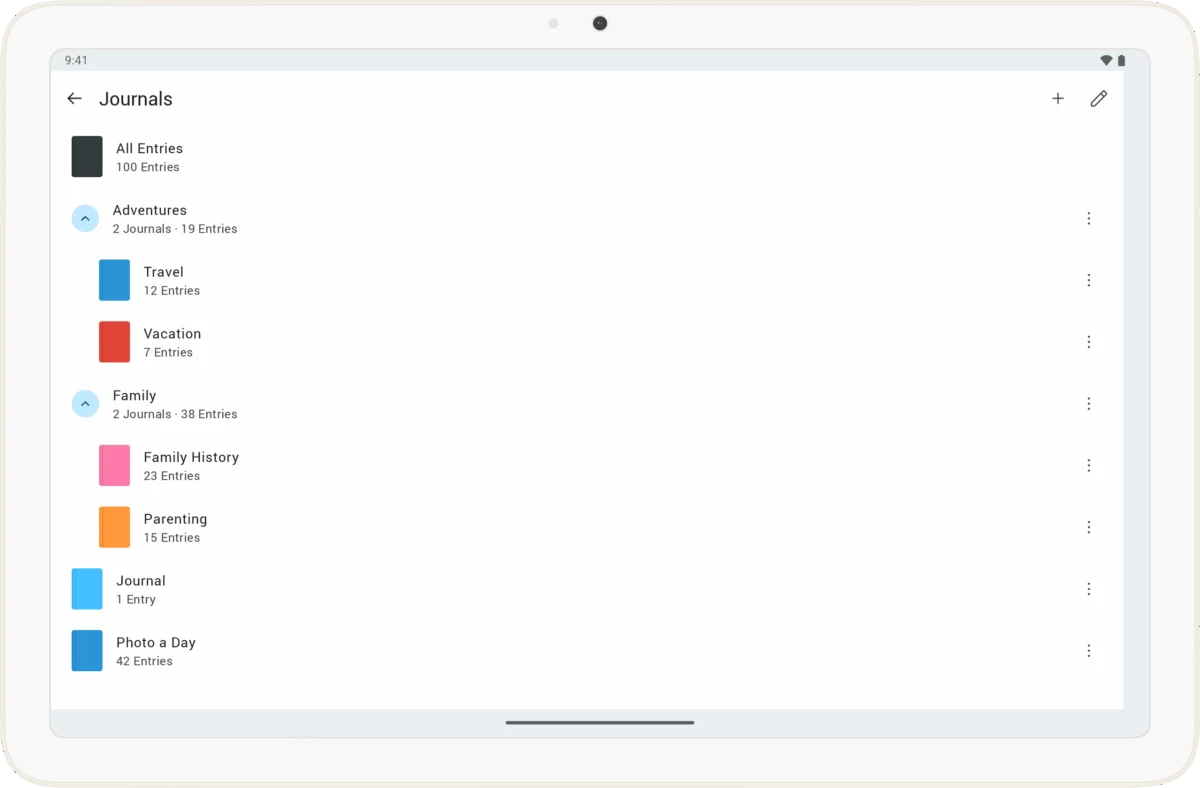
At its heart, a "Collection" is a organizational wrapper—a named, collapsible group that houses individual journals. The philosophy behind this update is one of "non-destructive organization." By implementing Collections, Day One is not merging feeds or altering the underlying data structure of the user’s entries; rather, it is providing a visual hierarchy for the navigation menu.
For the user, this means the end of an endless, vertical scroll through disparate journals. A professional who keeps multiple project-based logs can now collapse their "Work" journals into a single unit, keeping their "Personal" or "Creative" reflections in a separate, equally tidy bucket. When the user needs to access a specific entry, they can expand the relevant collection; when they are finished, a single tap or click collapses the section, reclaiming valuable screen real estate.
Crucially, the functionality of the journals remains entirely autonomous. A journal within a collection retains its original sync settings, reminders, and encryption standards. This ensures that the user’s existing "system" remains intact while the interface surrounding it is optimized for clarity.
A Chronology of Digital Archiving: From Linear Logs to Structured Data
The evolution of Day One reflects the broader trend in personal knowledge management (PKM). In the early 2010s, digital journaling was largely linear—a single stream of consciousness saved in chronological order. As smartphone cameras improved and the integration of metadata (GPS, weather, activity tracking) became standard, journals became multi-dimensional databases.
- The Early Years (2011–2015): The app focused on the "daily entry," prioritizing simplicity and speed.
- The Multi-Journal Expansion (2016–2020): Recognizing that users wanted to segment their lives, Day One introduced multiple journals. While this solved the "what" of journaling, it created a new problem: the "where." As users created dozens of journals, the sidebar became a bottleneck.
- The Current Pivot (2024–2026): With the introduction of Journal Collections, the company is shifting its focus from capturing content to managing the archive. This transition acknowledges that users are now holding years, or even decades, of life data, and they require tools that resemble a personal filing system rather than a simple notepad.
Supporting Data: Why Organization Matters
The psychological impact of digital clutter is well-documented. A cluttered interface acts as a cognitive barrier; when a user opens their app and is greeted by a wall of thirty different journal titles, the "friction" of starting a new entry increases.
According to user feedback metrics shared by Day One, a significant percentage of churn—the act of users abandoning their journaling practice—is linked to the feeling of being overwhelmed by their own archives. By implementing hierarchical organization, Day One aims to lower the "activation energy" required to begin a new entry.
Key Technical Parameters:
- Single-Level Nesting: To prevent the very clutter it seeks to solve, Collections do not support sub-collections (nesting). This design choice enforces a "flat" hierarchy that remains easy to navigate on mobile devices.
- Cross-Platform Sync: Collections are fully synced across iPhone, iPad, Mac, and Android, ensuring that the organizational structure is consistent regardless of the device in use.
- Subscription Tiering: While the ability to create collections is reserved for Silver and Gold subscribers, the visibility and management of these collections are accessible to all users, ensuring that shared journals or collaborative projects remain viewable across the board.
Official Perspective: The Philosophy of "Breathable" Growth
In a recent briefing, the Day One development team emphasized that the goal of this release was "breathable growth." As users’ lives evolve, their journaling needs change. A parent might start a child’s journal that they keep for eighteen years; a professional might maintain a log of their career trajectory for a decade.
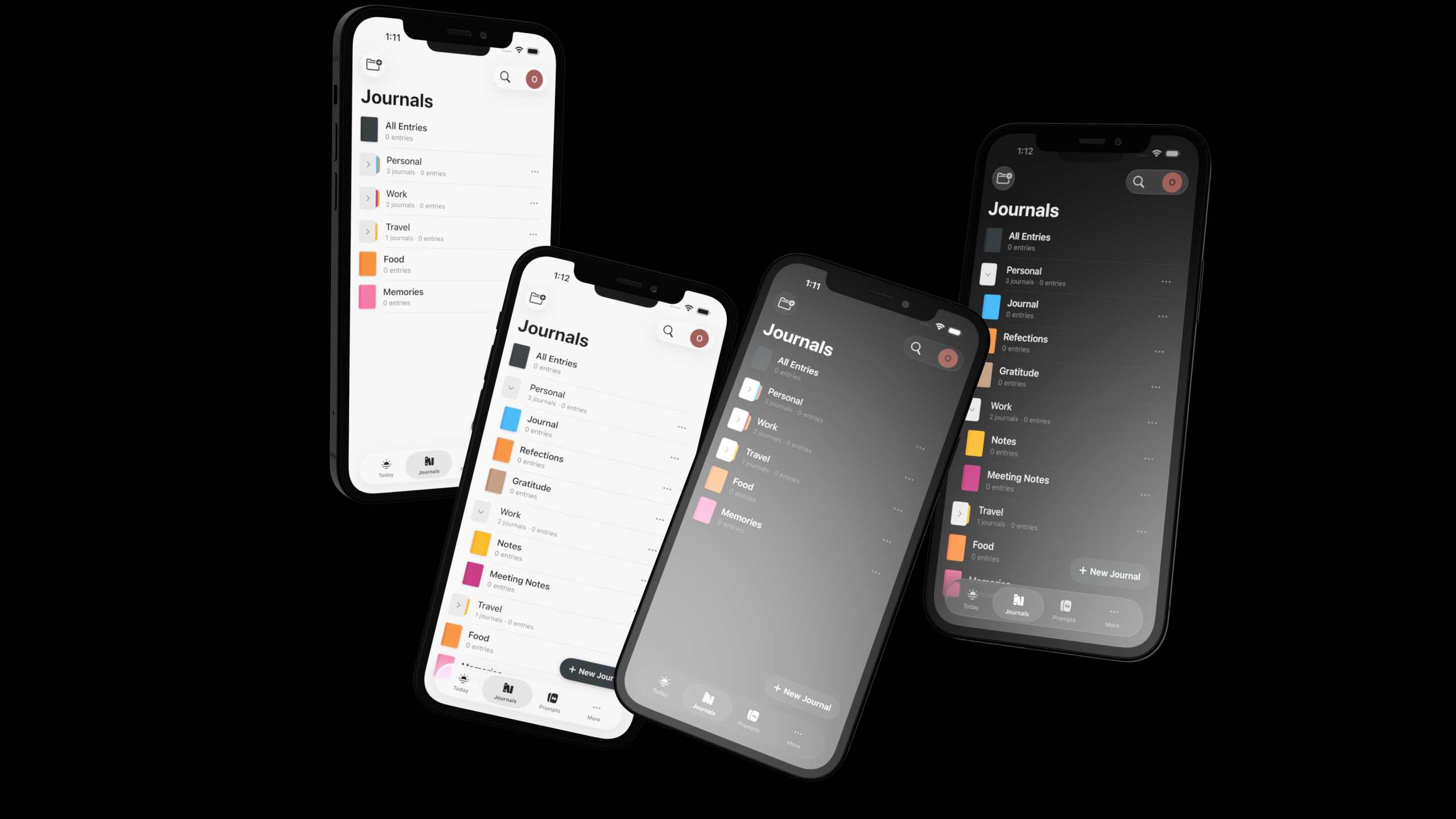
"The goal of Collections is not to add complexity," the company stated in its official launch documentation. "It is to reduce it. We want the user’s sidebar to feel like a calm, navigable environment rather than a frantic checklist."
The team noted that they spent months testing the "collapse" mechanic to ensure that it felt intuitive across different screen sizes. On mobile, where vertical space is at a premium, the ability to hide inactive journals is not just a preference—it is a functional necessity for a high-volume user.
Implications for the Future of Journaling
The launch of Journal Collections signals a maturity in the journaling software market. We are moving away from the "novelty" phase of digital diaries and into an era of "long-term archiving."
1. The Rise of the Personal Archive
As users accumulate thousands of entries, the app itself becomes a historical record of their lives. Features like Collections are the first step toward better "retrieval" tools. If journals are categorized, it stands to reason that future updates may allow for cross-journal searching or filtered views based on these collection groupings.
2. Streamlined Workflow Integration
By allowing users to separate "Active" journals from "Archived" ones, Day One is acknowledging that journaling is not always a daily active task. Some journals are reference materials. By moving these to a collapsed collection, the app shifts from a "daily task" interface to a "personal library" interface.
3. Cross-Platform Parity Challenges
The company has been transparent about the current limitations: while the feature is fully operational on mobile and macOS, the web and Windows versions are still catching up. This highlights the ongoing challenge of maintaining feature parity across disparate operating systems. For power users who operate in multi-OS environments, the "roll-out" period is a reminder that even the most robust ecosystems require time to synchronize their feature sets.
Getting Started: A User’s Guide to Implementation
For those ready to clean up their digital workspace, the implementation process is designed to be low-friction.
- The "Add" Button: Located at the top of the Journals sidebar, the new "Add" button allows users to create a collection instantly.
- Drag and Drop: On desktop platforms, moving a journal into a collection is as simple as dragging it into the group. On mobile, the interface uses a menu-driven approach to assign journals to their new homes.
- Non-Destructive Deletion: A critical point of clarification for nervous users: deleting a collection does not result in data loss. Should a user decide to disband their current organizational system, the journals simply revert to the top-level list. This safety net is essential for users who store years of irreplaceable personal history within the app.
Conclusion: A More Intentional Practice
Journaling is, at its core, an exercise in intentionality. By providing the tools to structure these journals, Day One is encouraging users to think more deeply about how they categorize their lives. Whether you are separating your professional work from your personal growth, or merely trying to hide the "Dream Journal" you haven’t touched since 2022, Journal Collections offers a necessary, elegant solution to the problem of digital abundance.
As we look toward the future of digital memory, the apps that succeed will not be the ones that offer the most features, but the ones that allow us to interact with our own past with the least amount of friction. With this update, Day One has taken a significant step toward ensuring that the digital diary remains a sanctuary—a place for reflection, not a source of management stress.