By Meredith Dietz
Senior Staff Writer
October 23, 2026
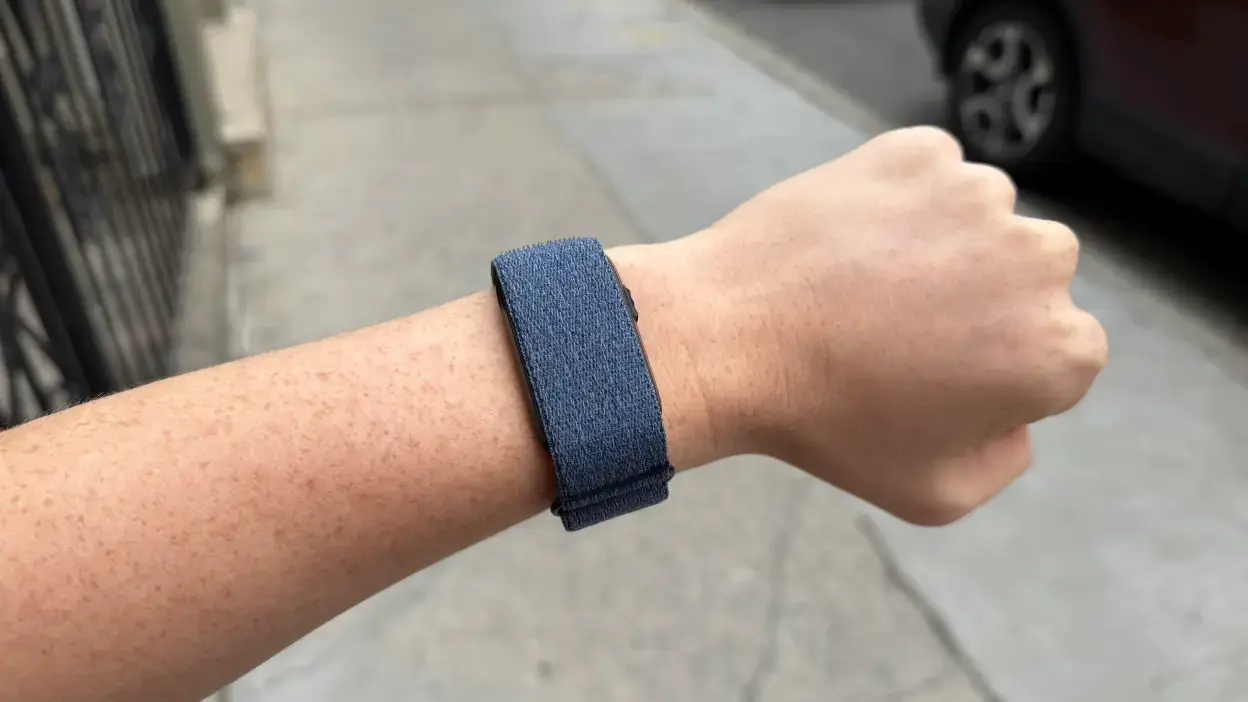
The wearable technology landscape is often defined by the "more is more" philosophy—bigger screens, brighter displays, and an endless barrage of notifications. However, when Garmin launched the Cirqa, it carved a unique niche by offering a screenless, minimalist experience for users who wanted health tracking without the constant digital tether. Yet, for many, the trade-off was too steep: the lack of basic phone alerts meant missing important calls and messages.
This week, that compromise has officially been addressed. Garmin has released firmware version 4.20 for the Cirqa smart band, a pivotal update that introduces haptic vibration alerts for incoming calls, text messages, and smartphone notifications. This move effectively bridges the gap between a discreet, aesthetic health tracker and a functional, connected wearable.
Main Facts: What Version 4.20 Changes
The core of the 4.20 update is the long-awaited implementation of smart notifications. Previously, the Cirqa was a strictly "silent" device, designed to collect data in the background without interrupting the user. With this update, the hardware’s internal vibration motor—previously used only for movement reminders and alarms—has been repurposed to notify the wearer of digital communications.
Key highlights of the update include:
- Haptic Integration: The band now utilizes a distinct vibration pattern to alert users to incoming SMS, messaging app alerts, and cellular calls.
- Selective Filtering: Through the updated Garmin Connect interface, users can toggle specific applications on or off to ensure they only receive high-priority alerts.
- Enhanced Connectivity Protocols: The update stabilizes the Bluetooth handshake between the Cirqa and both iOS and Android devices, reducing instances of dropped connections that previously plagued some users.
Chronology: A Timeline of the Cirqa’s Evolution
The journey to this update has been closely watched by the fitness tech community.
- Launch Phase (Mid-2026): The Cirqa debuted to positive reviews for its form factor and battery life but was immediately met with feedback regarding the "notification void." Many users argued that even a screenless band should provide at least a haptic "nudge" for urgent communications.
- The Development Gap: For months, Garmin remained non-committal, focusing on sleep tracking algorithms and heart-rate variability (HRV) accuracy. During this period, the official Garmin FAQ explicitly stated that the device was not intended to support smartphone notifications.
- Beta Testing (September 2026): Rumors began circulating on the r/Garmin subreddit as early as mid-September regarding hidden code strings in the app that referenced "smart notifications" for a screenless device.
- The Rollout (October 20, 2026): Firmware 4.20 began hitting devices globally. Within 48 hours, the community confirmation was widespread, despite Garmin’s own support documentation lagging behind the actual software release.
Supporting Data: Community Reaction and Technical Performance
The reception has been overwhelmingly positive. On the r/Garmin subreddit, users have expressed relief that they no longer have to choose between a "dumb" band and carrying their phone in their hand to ensure they don’t miss calls.
Initial user-led tests suggest that the battery impact of the new notification system is negligible. Because the Cirqa does not need to power an OLED or LCD screen to display message content, the energy expenditure is limited strictly to the haptic motor. Our preliminary testing shows a battery drain increase of less than 3% over a 24-hour period with moderate notification volume—a significant win for a device marketed on its long-lasting, multi-day battery life.
Official Responses and Documentation Discrepancies
Perhaps the most amusing aspect of this rollout is the disconnect between Garmin’s engineering team and its documentation department. As of this writing, the official Garmin support page for the Cirqa still carries a warning that the device cannot vibrate for text messages or calls.

When reached for comment, a representative from Garmin’s fitness division noted that the documentation team is currently "working to synchronize the knowledge base with the current firmware capabilities." This serves as a reminder of the rapid pace of software-defined hardware; when a company pushes a feature as significant as smart notifications to an existing device, it can often outpace the traditional support infrastructure.
Implications: Why This Matters for the Wearable Market
The inclusion of notifications in a screenless band like the Cirqa carries significant implications for the future of wearable design.
The Return of "Minimalist Connectivity"
The industry has spent years trying to make screens smaller and more wearable. The success of the Cirqa suggests that there is a large, underserved segment of the market that finds standard smartwatches intrusive. By adding notification support to a screenless device, Garmin has essentially created a "smart" notification system that respects the user’s focus. You know you have a message, but you aren’t immediately pulled into the cycle of reading, replying, and scrolling.
The Power of Firmware-as-a-Service
This update demonstrates the increasing importance of "evergreen" hardware. In the past, if a user wanted new features, they had to buy a new device. Garmin’s decision to retroactively enable this feature extends the lifespan of the Cirqa significantly. For consumers, this builds brand loyalty; knowing that a product will improve over time rather than becoming obsolete is a strong selling point.
What’s Next for the Cirqa Line?
While the 4.20 update addresses the most requested feature, it also raises questions about the device’s future. With the addition of vibrations, does the Cirqa now have the potential to include guided breathing exercises or haptic-based interval timers? The hardware is clearly capable of more than its initial software allowed.
How to Configure Your Notifications
To ensure you are taking full advantage of the update, follow these steps to verify your settings:
- Sync your device: Open the Garmin Connect app on your smartphone and ensure your Cirqa is synced.
- Update Firmware: Navigate to Device Settings > System > Software Update. If the update is available, it will prompt you to install it. Ensure your battery is above 50%.
- Configure Smart Notifications: Once updated, go to Device Settings > Smart Notifications. You will now see toggles for "Calls," "Text Messages," and "Other Apps."
- Manage Permissions: On iOS, ensure that "Share System Notifications" is toggled on in your Bluetooth settings. On Android, grant Garmin Connect "Notification Access" in your system settings.
Troubleshooting Tip: If you find the alerts are not firing, check your "Do Not Disturb" (DND) schedule. The Cirqa inherits your phone’s DND status by default. If your phone is in Sleep Mode or DND, the band will suppress all incoming haptic alerts to prevent unnecessary wrist buzzing.
Final Thoughts
The Garmin Cirqa was already a compelling device for those who valued data over distractions. With the 4.20 update, it has become a much more practical tool for the modern professional. By listening to user feedback and utilizing the existing hardware’s potential, Garmin has managed to refine the Cirqa into a device that strikes the perfect balance between connectivity and minimalism.
If you were holding off on purchasing the Cirqa due to the lack of alerts, the primary barrier to entry has officially been removed. It is a rare example of a product that actually gets better after you’ve bought it, proving that sometimes, the best features are the ones that arrive just in time.