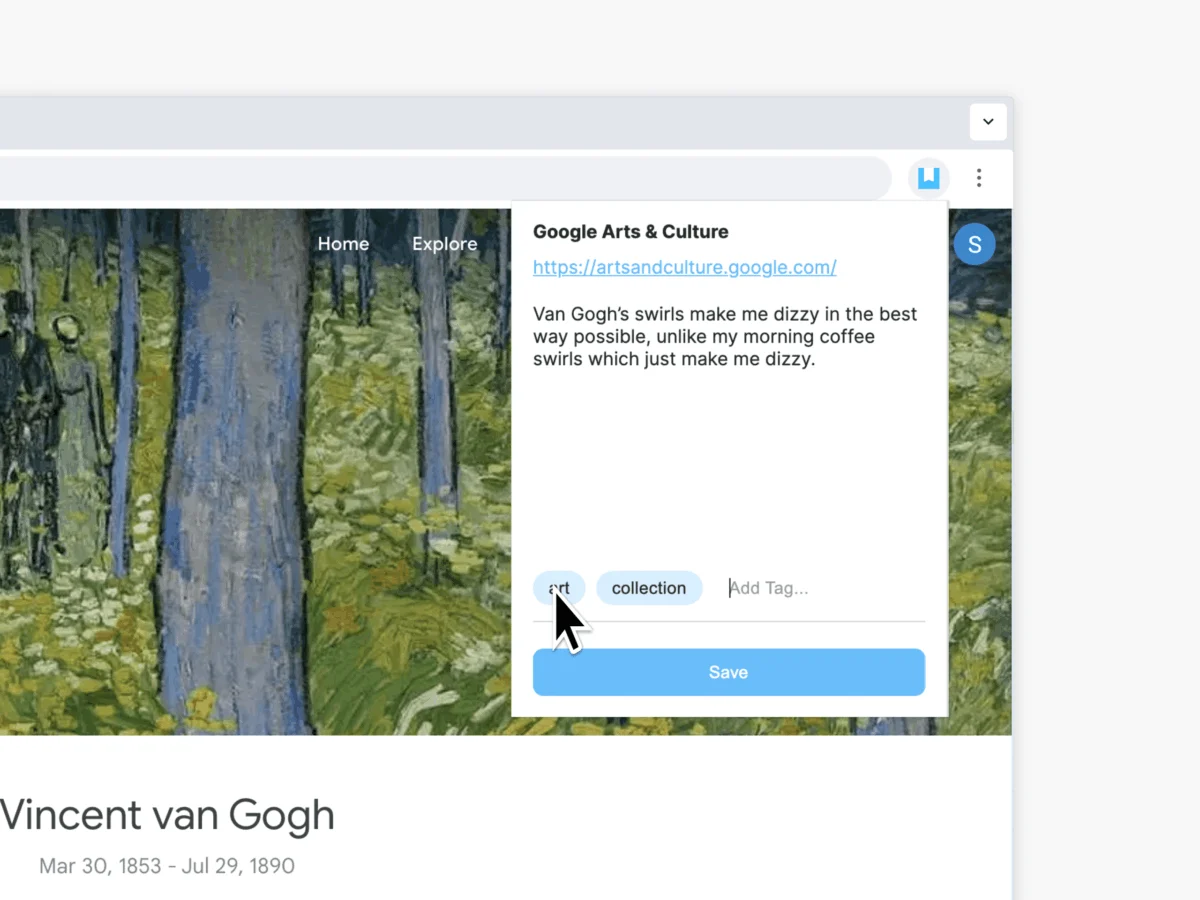
In an era defined by information overload, the challenge for digital citizens is no longer finding content, but retaining it. Every day, users encounter articles, profound quotes, research data, and visual inspiration that vanish into the "digital graveyard" of browser bookmarks, only to be forgotten. Addressing this friction, Day One—the industry-leading journaling application—has officially unveiled its dedicated browser extensions for Google Chrome and Mozilla Firefox. This release marks a significant shift in how users can bridge the gap between their online activity and their personal reflection, transforming the web into a curated archive of their lives.
The Evolution of Digital Archiving: Main Facts
The new Day One browser extensions are designed to streamline the "capture" process. Instead of manually copying, pasting, and organizing snippets of text or URLs into a document, users can now send web content directly into their Day One journal with a single click.
Key functionalities of this new integration include:
- Seamless Integration: The extension acts as a conduit between the active browser tab and the Day One cloud.
- Contextual Capture: Users can save entire articles, specific highlights, or personal notes alongside the original source URL.
- Centralized Timeline: Rather than scattered bookmarks, captured items are integrated into the user’s primary Day One timeline, allowing for chronological review and contextual journaling.
- Cross-Platform Sync: Content saved via the browser is immediately available across the Day One ecosystem, including iOS, Android, and desktop applications.
By integrating this tool, Day One is positioning itself not just as a diary app, but as a comprehensive life-logging platform that reconciles the ephemeral nature of the internet with the permanent nature of personal records.
A Timeline of Development: From Local Journaling to Global Sync
The journey toward this release is rooted in the platform’s transition from a simple note-taking tool to a sophisticated digital vault.
- The Early Years (2011–2015): Day One began as a minimalist application focused on local text entries. During this period, "capturing the web" was a manual, often tedious process involving screenshots or external note-taking apps.
- The Cloud Shift (2016–2020): With the introduction of end-to-end encryption and robust cloud syncing, the platform shifted focus toward multimedia, including photos, location data, and weather. The user base began demanding better ways to import external data.
- The "Connected Life" Era (2021–2024): Following the acquisition by Automattic (the parent company of WordPress.com), Day One began a period of rapid infrastructure growth. Development teams prioritized "frictionless entry," leading to the beta testing of browser-based capture tools.
- The Launch (August 2025): The official rollout of the Chrome and Firefox extensions represents the culmination of this strategy, finally allowing users to treat the web as an extension of their personal memory.
Data Security and Privacy: The "Private by Design" Paradigm
In a digital landscape often criticized for invasive data collection, Day One has doubled down on its commitment to privacy. The primary concern with browser extensions is often the "permission" they require to read web pages.
The company has addressed these concerns by adhering to a strict "Private by Design" framework:
- End-to-End Encryption: All content captured through the extension is encrypted before it leaves the browser. This ensures that even the company’s servers cannot read the content being saved.
- Minimized Permissions: The extension is engineered to only access the necessary data to perform the capture, avoiding the "wholesale" data scraping seen in other third-party tools.
- Local Control: Users maintain full authority over what is saved and how it is organized. Unlike social media platforms that use browser data to build advertising profiles, Day One’s extension operates in a "zero-knowledge" environment.
This focus on privacy is not merely a marketing stance; it is a fundamental architecture requirement that keeps the app competitive in an age of growing surveillance concerns.
Industry Perspectives: Why Capture Matters
The release comes at a time when the "Personal Knowledge Management" (PKM) movement is surging. Experts in digital organization have long argued that we are suffering from "context switching fatigue."
"When you bookmark a page, you are essentially creating a to-do list for your future self," says Dr. Elena Vance, a researcher in digital anthropology. "But we rarely return to those bookmarks because they lack emotional context. By moving these links into a journal, you are tagging them with a specific time and mood. You aren’t just saving a link; you are saving why that link mattered to you in that specific moment."

Day One’s team emphasizes that this is the primary goal of the extension: to move away from "hoarding" information and toward "meaningful collection." By allowing users to add their own notes to the saved content, the extension encourages the user to synthesize information rather than just store it.
Implications for User Workflow and Future Development
The introduction of these extensions has immediate implications for different user demographics:
For the Researcher and Academic
The ability to save citations, articles, and research snippets directly into a chronological journal allows for a "research log" that tracks the evolution of a project over weeks or months.
For the Content Creator
Creators often need to track sources of inspiration. The extension serves as a "swipe file" that is automatically organized by date, making it easier to revisit the original source of an idea.
For the Casual User
The primary benefit is the reduction of "browser clutter." Users who keep 50+ tabs open for "later" can now offload those items to their journal, effectively clearing their workspace while keeping their intellectual interests safe.
Looking forward, the success of these extensions will likely influence the next wave of updates for Day One. If user adoption is high, we can expect to see deeper integration with web-based productivity suites, potentially allowing for the direct import of calendar events, task lists, and even collaborative document snapshots.
How to Get Started: A Practical Guide
For users looking to integrate this tool into their daily workflow, the process is designed to be as frictionless as possible:
- Installation: Visit the Day One website and navigate to the "Extensions" page. Select the link for your preferred browser (Chrome or Firefox).
- Authentication: Once installed, click the extension icon and sign in with your Day One credentials. This links the extension to your specific, encrypted database.
- Customization: Access the extension settings to define default journals, tags, and formatting preferences for captured content.
- Usage: When visiting a page of interest, click the extension icon. A pop-up will appear, allowing you to add personal thoughts, select a specific journal, and finalize the entry.
The team has also released a comprehensive tutorial on their official blog, detailing advanced features like keyboard shortcuts and batch saving for power users.
Conclusion: A New Chapter for Memory
The launch of the Day One browser extensions is a pivotal moment for a platform that has spent over a decade defining the standards of digital journaling. By simplifying the act of capturing the web, Day One is acknowledging a fundamental truth about our modern lives: we spend more time online than ever before, and our memories are increasingly woven into the fabric of the digital world.
Whether it is a recipe for dinner, a complex scientific paper, or a piece of art that sparked a new creative endeavor, these moments deserve a place in our personal history. With this new tool, Day One has successfully bridged the divide between the fleeting nature of the internet and the enduring value of the personal journal. As we look toward the future, it is clear that the most valuable commodity in the digital age is not information itself, but the ability to make that information a meaningful part of our personal story.