
By Meredith Dietz
Senior Staff Writer, Lifehacker
October 23, 2026
For years, Garmin has been the gold standard for fitness enthusiasts, triathletes, and outdoor adventurers who prioritize battery longevity above all else. Unlike standard smartwatches that require nightly charging, Garmin devices have historically been defined by their ability to last for days—or even weeks—on a single charge. However, a significant software update released in September 2026 has introduced a feature that threatens this hallmark reputation.
The rollout of the "OK Garmin" hands-free voice command system was intended to bring modern convenience to the company’s flagship wearables. Instead, it has triggered a wave of frustration across user forums as owners of the Fenix 8, Forerunner 570, Forerunner 970, and Venu 4 report a staggering collapse in their devices’ battery performance.
The Core Conflict: Convenience vs. Longevity
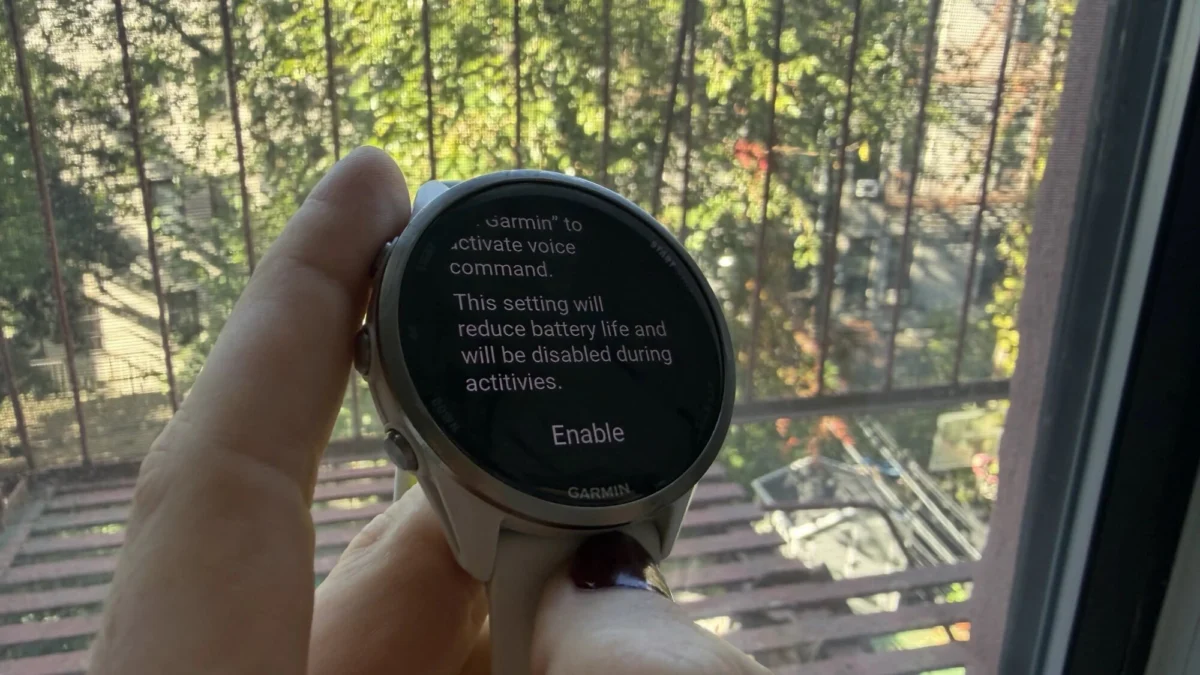
The "OK Garmin" feature, launched alongside a suite of updates including all-day fall detection and new "Quick Workout" routines, allows users to trigger voice commands without touching their watch. While the prospect of hands-free interaction sounds enticing for runners mid-sprint or cyclists mid-ride, the underlying technology requires the watch’s microphone to remain in a constant, active "listening" state.
This "always-on" microphone architecture is the primary culprit behind the sudden battery drain. By maintaining a continuous state of alertness to detect the wake phrase, the watch’s processor and power management system are pushed beyond their typical operational limits. According to widespread reports from the Garmin support forums, users are observing a 35% to 50% decrease in projected battery life immediately following the installation of the September firmware update.
A Chronology of the Update and Resulting Backlash
The timeline of the issue is relatively short but intense, highlighting the rapid escalation of user dissatisfaction:
- Early September 2026: Garmin officially releases a major feature update for the Fenix 8, Forerunner 570, Forerunner 970, and Venu 4 series. The update introduces advanced health monitoring tools and the much-hyped "OK Garmin" hands-free voice activation.
- Mid-September 2026: Within days of the update, the first threads appear on the official Garmin forums. Users begin posting screenshots of their battery estimate pages, showing significant drops in estimated runtime.
- Late September 2026: Reports of battery drain move from fringe complaints to widespread consensus. The issue is confirmed across multiple models, suggesting the problem is rooted in the software’s implementation of the voice-listening background process rather than hardware defects.
- October 2026: As the backlash grows, the consensus among power users and tech reviewers solidifies: the "OK Garmin" feature, while technically impressive, is not optimized for the battery-first ethos that defines the Garmin brand.
Supporting Data and Technical Reality
The severity of the issue varies depending on the specific watch model and the user’s typical settings, but the trend is undeniable. For a device like the Fenix 8—which is often chosen specifically for its multi-day (or multi-week) battery life—a 50% reduction in capacity effectively turns a "weekend-ready" watch into one that requires daily attention.

Garmin’s own documentation, while not offering specific percentages, does acknowledge that the activation of voice-related features will inevitably lead to a higher power draw. The technical reality is straightforward: digital signal processing (DSP) for voice recognition requires constant power to the microphone array and the supporting circuits that interpret audio inputs.
While Garmin hasn’t released an official patch to "fix" the efficiency of the wake-word detection, the company’s support documentation subtly shifts the responsibility to the user. By framing the power drain as an expected "tradeoff" for hands-free capability, the company is effectively telling users that they must choose between the convenience of voice control and the convenience of not charging their watch every 24 to 48 hours.
Official Stance and Manufacturer Response
To date, Garmin has maintained a relatively low profile regarding the specific scale of the battery drain. In official responses provided to users on their support forums, the company reiterates that the watch’s projected battery runtime is an estimate based on current settings and usage patterns.
The company has not issued a formal "recall" or a mandatory "rollback" of the software, likely because the feature is functioning exactly as it was designed to—the problem is that the design itself is inherently power-intensive. Garmin representatives have emphasized that users who value battery life over voice convenience should simply disable the feature.
How to Reclaim Your Battery Life
If you are currently experiencing a rapid drain on your Fenix 8, Forerunner 570/970, or Venu 4, you do not need to wait for a software update to fix the issue. You can manually disable the "OK Garmin" functionality and immediately see an improvement in your watch’s battery estimates.
Follow these steps to deactivate the feature:
- Open the Settings Menu: Navigate to the main menu on your watch by holding the "Up" button or selecting the gear icon.
- Access System Settings: Scroll down to the System sub-menu.
- Find Voice Controls: Look for the Voice menu item.
- Disable "OK Garmin": Toggle the "OK Garmin" switch to the "Off" position.
- Manage Phone Assistant: If you are still seeing high battery usage, locate the Phone Assistant wake word setting in the same menu and toggle it to "Off" as well.
It is important to note that disabling these features does not disable your ability to use voice commands entirely. You can still trigger voice assistants through the physical buttons on your watch. This hybrid approach—using physical inputs to activate voice features—is arguably the best of both worlds, as it allows the watch to remain in a low-power "sleep" state until you explicitly decide to engage the voice system.

Implications for the Future of Wearable Tech
This episode serves as a cautionary tale for the wearable industry. As smartwatches become increasingly "smart," manufacturers are under constant pressure to add features that compete with general-purpose devices like the Apple Watch or Google Pixel Watch. However, Garmin’s customer base is distinct. They are not looking for a wrist-mounted smartphone; they are looking for a reliable, long-lasting instrument for health and performance tracking.
When a feature that promises "convenience" significantly hinders the core value proposition of a device—its reliability and longevity—it risks alienating the core user base. The "OK Garmin" controversy highlights the tension between the modern desire for AI-driven, hands-free interaction and the physical limitations of battery technology in small, portable devices.
Moving forward, it is likely that Garmin will need to refine its software to be more aggressive in its power management—perhaps by implementing "smart listening" that only activates the wake-word processor during specific activities or times of day. Until such optimizations are made, users are advised to treat these new features with caution.
Final Thoughts: The Cost of Convenience
It is worth noting that the battery estimates displayed on your watch are exactly that: estimates. They are not based on independent, long-term testing of every possible configuration. Some of the complaints surfacing on forums may be compounded by other background processes, such as high-frequency GPS tracking, SpO2 monitoring, or excessive notification syncing.
However, the consensus is clear: if you are a user who prizes every hour of battery life, the "OK Garmin" feature is likely not worth the sacrifice. In the world of fitness wearables, there is a delicate balance to be struck between cutting-edge software features and the fundamental requirement that a watch should be ready to perform when you are. For now, the safest bet for the Garmin community is to stick to the physical controls and leave the voice-activated, battery-draining experiments for those with a charger close at hand.