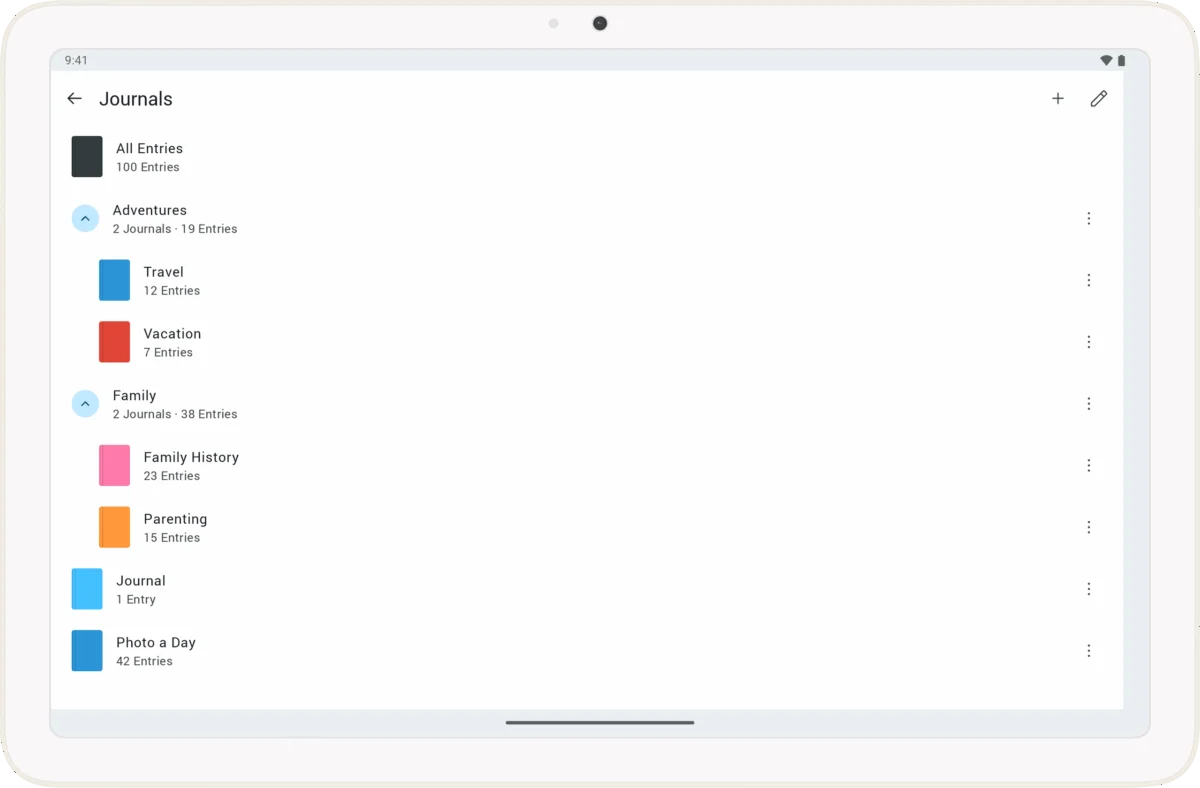
For the modern digital chronicler, the act of journaling has evolved far beyond a simple daily log. It has become a sophisticated, multi-faceted practice. Users of Day One—the industry-leading journaling application—often maintain distinct silos for their lives: a travel diary for globetrotting adventures, a professional log for career milestones, a gratitude journal for mental well-being, and a dedicated space for parenting notes.
However, as the depth of a user’s journaling practice increases, so does the length of their sidebar. This "sidebar bloat" has long been a minor point of friction for power users. Today, Day One is addressing this by introducing Journal Collections, a feature designed to bring hierarchy and order to the digital shelf without altering the fundamental integrity of the individual journals themselves.
Main Facts: Bringing Order to the Sidebar
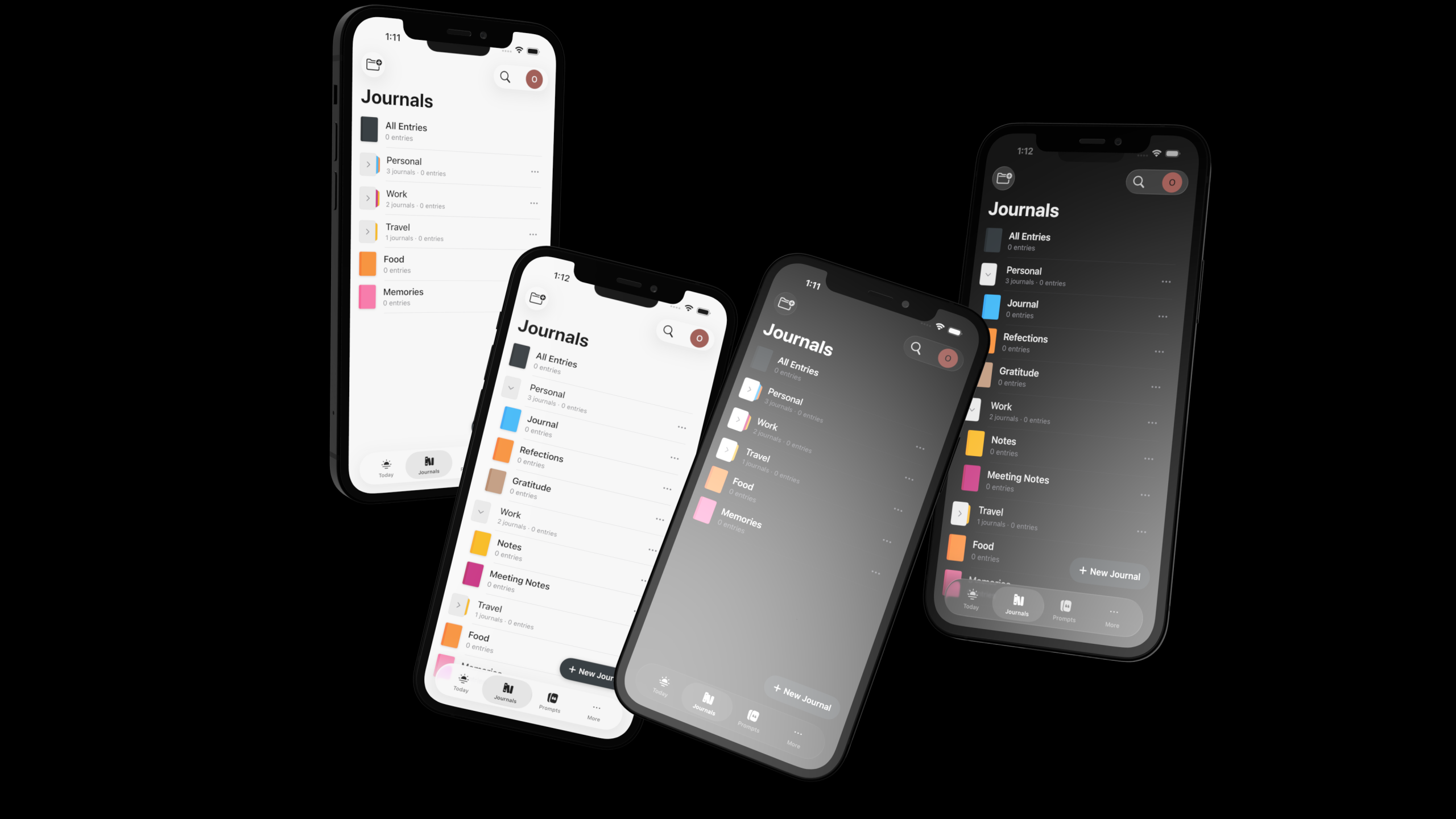
At its core, Journal Collections is a structural organizational tool. It allows users to group multiple journals under a single, expandable header within the sidebar. This move represents a shift in how Day One handles user interface (UI) management, moving from a flat, linear list to a nested, hierarchical structure.
The primary function of a Collection is to serve as a container. Users can name these containers according to their specific needs—such as "Personal," "Professional," "Archives," or "Creative Projects." Critically, the introduction of this feature does not merge the contents of these journals. Each remains an independent entity with its own sync settings, reminders, and encryption protocols.
When a user creates a collection, they gain the ability to expand or collapse that group within the sidebar. This allows for a clean, minimalist workspace where only the most relevant journals are visible at a given time. If a user is in a professional mindset, they might expand their "Work" collection while collapsing their "Personal" or "Travel" folders, thereby reducing visual noise and enhancing focus.
Chronology: The Evolution of the Day One Ecosystem
The rollout of Journal Collections follows years of iterative updates aimed at balancing power-user needs with accessibility for casual diarists.
- Early Development: Day One established itself as the gold standard for digital journaling by focusing on speed, security, and cross-platform synchronization. Over the last decade, as the application’s user base expanded, the demand for more robust organizational tools grew alongside the platform.
- The "Clutter" Feedback Loop: Through user surveys and support ticket analysis, the Day One development team identified that long-time users were increasingly struggling with navigation. The sidebar, once a simple list, had become a daunting column of dozens of journals.
- The Beta Phase: Internal testing of the Collections feature began in early 2026, focusing on ensuring that the organization of the sidebar would sync seamlessly across disparate operating systems, including iOS, macOS, and Android.
- The Launch: As of July 2026, the feature is rolling out to the global user base, marking a significant milestone in the app’s maturity.
Supporting Data and Technical Implementation
The implementation of Collections was designed with a "non-destructive" philosophy. This means that if a user decides to delete a collection, the journals housed within it are not erased. Instead, they are simply "un-grouped" and return to the primary, top-level sidebar list. This safeguard ensures that users can experiment with different organizational taxonomies without fear of data loss.
Technical Constraints and Compatibility
The feature is currently being deployed in stages across the platform’s diverse ecosystem:
- Mobile and Desktop: Full functionality is available on iPhone, iPad, Mac, and Android, including the ability to create, move, and toggle the collapse state of collections.
- Web and Windows: While viewing and basic navigation are supported, the ability to create new collections on these platforms is currently in a staggered rollout phase.
- Sync Logic: The "collapse state"—the memory of which folders are open or closed—is handled locally per device. This allows a user to keep their Mac sidebar expanded for deep work, while keeping their iPhone sidebar collapsed for quick, distraction-free entries on the go.
Official Perspectives: Why "Less is More"
In statements regarding the update, the Day One team emphasized that the philosophy behind this launch is one of "calm."
"The goal of Collections is not to add complexity," a company representative noted. "It is to reduce it. We observed that as our users’ journaling habits deepen, the sidebar becomes a barrier rather than a gateway. By giving that growth room to breathe, we are helping users return to the primary mission of the app: reflecting on their lives."
The decision to limit Collections to a single level of nesting—meaning users cannot place a collection inside another collection—was a deliberate UX choice. By keeping the hierarchy shallow, the team aimed to prevent the "folder rabbit hole" that plagues many file-management systems, ensuring that even with dozens of journals, a user is never more than a few clicks away from their destination.
Implications for the Journaling Community
The introduction of Journal Collections is likely to have significant implications for how users interact with their history.
1. The Psychology of Organization
For many, the physical act of organizing a digital space provides a psychological sense of closure. By grouping journals into "Active" and "Archive" collections, users can symbolically move past finished chapters of their lives, such as a completed academic year or a concluded project, without the finality of deleting the content.
2. Streamlining the "High-Volume" User
Professional journalists, academics, and therapists who use Day One to track long-term projects will find the most immediate benefit. The ability to hide irrelevant journals allows for a "focused mode" that is essential for maintaining a consistent daily practice.
3. Subscription Value
The requirement of a Day One Silver or Gold subscription to create collections serves as a differentiator for the platform’s premium tier. While the viewing and management of existing collections remain free for all users, the organizational power is reserved for those who rely on the platform for high-density, multi-journal workflows.
Looking Ahead
As Day One continues to iterate on its feature set, the focus remains on the balance between power and simplicity. The company has signaled that while Journal Collections are currently a one-level hierarchy, future updates will continue to refine the user experience based on how this new organizational layer is adopted.
For the user, the message is clear: your journals are a growing reflection of your life, and the tools you use to manage them should be as flexible as your memory. By providing a clean, collapsible, and intuitive way to manage the sidebar, Day One has effectively lowered the friction of the journaling habit, proving that even in a digital world, organization is the key to clarity.
Whether you are a casual observer of your daily life or a dedicated keeper of multiple, complex archives, the introduction of Journal Collections offers a necessary, refined solution to the problem of digital clutter. As the platform continues to evolve, the ability to categorize, collapse, and curate one’s digital life will undoubtedly remain a cornerstone of the Day One experience.