The landscape of professional productivity is shifting beneath our feet. For years, the creation of presentation decks has been a manual, time-intensive process requiring a delicate balance of design intuition and narrative structure. Now, OpenAI has entered the fray with "ChatGPT Slides," a dedicated feature designed to transform conversational AI into a full-scale office suite.
As OpenAI aggressively pushes toward an all-in-one ecosystem that rivals Google Workspace and Microsoft 365, the introduction of native slideshow creation marks a critical milestone. But does this new tool genuinely simplify workflow, or is it merely a flashy addition to an increasingly expensive subscription model? We took a deep dive into the feature to see how it stacks up against the established titan of the industry: Google Gemini.

The Core Developments: ChatGPT Slides Explained
OpenAI’s latest rollout, ChatGPT Slides, is designed to generate PowerPoint-style decks directly within the interface. While basic PowerPoint export functionality has been available to general users for some time, the new "Slides" feature represents a more integrated, iterative experience.
Currently, this capability is being rolled out primarily to "Pro" tier subscribers. This creates a significant barrier to entry, as these premium plans carry a monthly cost upwards of $100. For those on the entry-level free tier or the $20-a-month "Plus" plan, the experience remains relegated to generating static, downloadable files without the benefit of a native, in-app editor.

The strategic intent is clear: OpenAI wants to keep users within its "walled garden." By developing a word processor (Pages) and a forthcoming spreadsheet application, the company is signaling that it no longer intends to be a chatbot—it intends to be a digital office.
A Chronology of the AI Presentation Wars
The race to automate professional presentations began in earnest with the integration of Large Language Models (LLMs) into standard productivity suites.

- Early 2024: Both Google and Microsoft began testing "Magic Slide" style features, allowing users to generate text outlines for presentations via simple prompts.
- Mid-2024: OpenAI introduced basic file export features, allowing users to convert conversation transcripts into .pptx files, though the output was often primitive and lacked structural depth.
- October 2026: The official launch of "ChatGPT Slides" as a dedicated workspace. This marked the shift from "exporting text" to "building a presentation" within a native editor.
- Present Day: Users are now weighing the value of a high-cost, proprietary ecosystem (OpenAI) against the deeply integrated, lower-cost model provided by Google’s Gemini-powered Workspace.
Comparative Performance: The "iPhone Duo" Test
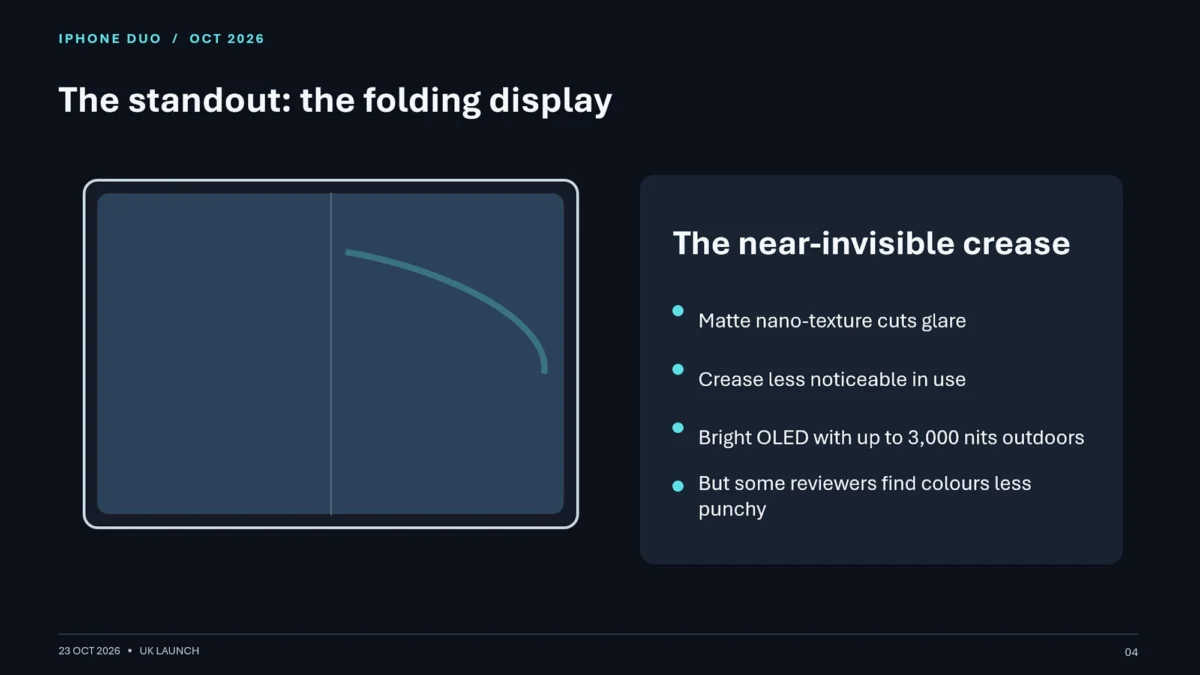
To assess these tools fairly, we conducted a controlled experiment. We tasked both ChatGPT Slides (Pro tier) and Google Gemini (Google AI Pro, $19.99/mo) with creating a comprehensive presentation on the "iPhone Duo," a hypothetical foldable device.
The ChatGPT Experience
On the $20/month Plus plan, ChatGPT produced a functional but aesthetically sparse slide deck. The information was accurate, but the design felt like a "hurried template." Crucially, it lacked granular control. You could request an image of the device, but integrating it required specific prompting, and the resulting layout felt rigid.

Upgrading to the Pro-tier "ChatGPT Slides" workspace, the experience improved significantly. The tool provided a dedicated space for building the deck, allowing for manual resizing and repositioning of elements. However, the process felt less like "designing" and more like "directing a stubborn assistant." It is powerful, yet prone to occasional bugs where complex prompts lead to partial rendering failures.
The Gemini Experience
In contrast, Google’s integration of Gemini within Google Slides felt more "human-centric." Gemini actively engaged in the process, asking clarifying questions about the target audience and visual style before generating a single slide.

The output was visually superior. Gemini’s ability to draw from a wider library of design assets and professional layout presets resulted in a deck that looked ready for a boardroom. However, the "hallucination" factor was present; Gemini struggled with technical specifications, incorrectly stating the screen brightness, and generated a comical, inaccurate image of the phone.
Technical and Qualitative Data Breakdown
| Feature | ChatGPT Slides (Pro) | Google Gemini (AI Pro) |
|---|---|---|
| Price Point | ~$100/mo (Pro Tier) | $19.99/mo |
| Design Quality | Functional, algorithmic | Polished, human-like |
| Fact Accuracy | High (retrieved from web) | Moderate (prone to hallucination) |
| Editing Control | High (pixel-level tweaks) | Moderate (template-based) |
| Collaboration | Internal ecosystem focus | Native Google Workspace sharing |
Official Perspectives and Industry Implications
OpenAI has remained tight-lipped regarding specific user metrics for the new Slides feature, focusing instead on its mission to "build an end-to-end cognitive workspace." Their spokesperson noted that the goal is to reduce the "context switching" that occurs when a user moves from a research chat to a design application.

Industry analysts suggest that this move is a direct threat to the dominance of Microsoft PowerPoint and Google Slides. If an AI can generate a perfect, brand-compliant deck from a single meeting transcript, the traditional role of the "presentation designer" may be fundamentally altered.
However, the high cost of the Pro tier suggests that, for now, OpenAI is targeting enterprise clients and power users rather than the general consumer. Google, meanwhile, is betting on "utility at scale." By offering Gemini at a price point nearly five times lower than OpenAI’s Pro offering, Google is positioning itself as the more pragmatic choice for the average professional.

Implications for the Future of Work
What does this mean for the average employee?
- The Death of the "Blank Slide": The days of staring at a blank presentation deck are numbered. Both tools excel at providing a solid foundation. Even if the output requires a final 10% polish, the "cold start" problem is solved.
- The Rise of the "Prompt Designer": As these tools mature, the skill set required for success is shifting. Mastery of the software (how to move a text box) is becoming secondary to mastery of the prompt (how to clearly define a narrative arc and visual tone).
- The "Hallucination" Trap: As evidenced by the iPhone Duo image debacle, AI tools still lack a grounded understanding of reality. For professional environments, the "human-in-the-loop" approach is mandatory. You cannot simply press "generate" and present to a client without rigorous fact-checking.
Final Verdict: Which One Should You Use?
If you are already deeply entrenched in the ChatGPT ecosystem and require a tool that allows for granular, prompt-based editing of individual slide elements, the ChatGPT Pro experience is a compelling—albeit expensive—option. Its ability to pull official, accurate imagery and its robust, if slightly tedious, control scheme makes it a powerhouse for data-heavy presentations.

However, for the vast majority of users, Google Gemini remains the superior choice. The lower price point, combined with the seamless integration into the existing Google Workspace, makes it an easier pill to swallow. Gemini’s superior aesthetic sensibility, despite its occasional factual blunders, means that your end result will look more like a professional deck and less like a computer-generated report.
The race is far from over. As OpenAI refines its "Slides" workspace to be less buggy and more intuitive, the gap will likely close. For now, however, the "AI-assisted office" is a work in progress—an impressive, fascinating, and deeply flawed experiment that is already changing how we communicate our ideas to the world.