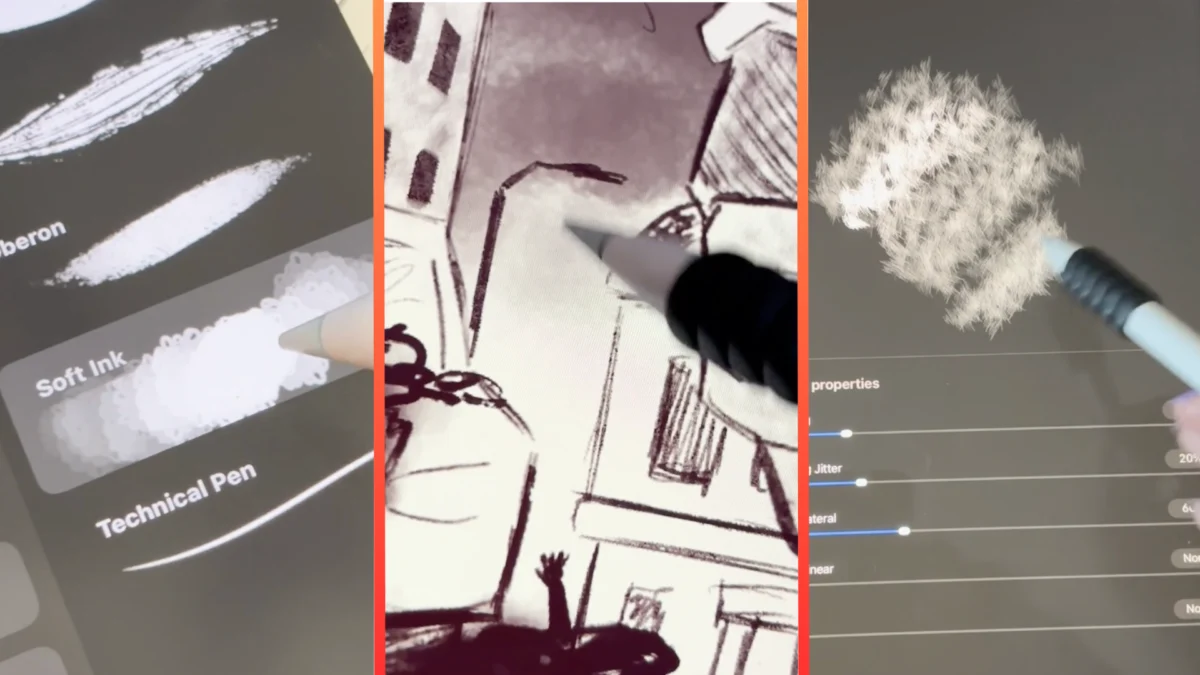
As the autumn leaves turn and the nights draw in, artists across the globe are once again picking up their pens—both physical and digital—to participate in the annual creative marathon known as Inktober. For the uninitiated, Inktober is a month-long challenge that encourages artists to produce one ink drawing every day throughout October. However, for those working within the digital ecosystem, the challenge offers a unique opportunity to experiment with texture, flow, and atmospheric depth.
To elevate your October illustrations, we are highlighting an essential resource from digital artist Phoebe Shore. Shore has curated a comprehensive, "easy-peasy" video tutorial dedicated to crafting bespoke, spook-inspired inky brushes specifically for Procreate. Whether you are aiming for subtle atmospheric grit or visceral, horror-inspired splatters, these custom tools are designed to streamline your workflow and sharpen your aesthetic.
The Technical Foundation: Procreate and Hardware Requirements
Before diving into the creative process, it is vital to understand the technological prerequisites for this tutorial. Procreate has long been hailed as the gold standard for digital illustration on mobile hardware, but its exclusivity remains a critical factor for artists planning their setup.
The Apple Ecosystem Constraint
Procreate is a proprietary software developed by Savage Interactive, designed exclusively for iPadOS. Because the software leverages Apple’s Metal graphics API to provide low-latency performance and highly optimized pressure sensitivity, it is not available for Android tablets, Windows PCs, or traditional desktop operating systems.
For those looking to participate in this tutorial, you will need one of the best iPads for drawing. This typically includes the iPad Pro (11-inch or 12.9-inch), the iPad Air (M1 or M2 series), or the latest standard iPad models that support the Apple Pencil. The integration between the Apple Pencil’s tilt and pressure sensitivity and Procreate’s brush engine is what makes these custom brushes possible; without this specific hardware synergy, the nuance of the brush strokes—particularly the splatter effects—would be lost.
Hardware Considerations for Serious Illustrators
If you are currently evaluating your gear, prioritize tablets with high-refresh-rate displays (ProMotion technology). This reduces the "input lag" between the tip of the Apple Pencil and the digital mark on the screen, creating a more tactile, "pen-on-paper" experience that is essential for the rapid, fluid strokes required for inking.
A Chronology of Digital Inking Evolution
The shift from traditional ink to digital emulation has been a decade-long evolution. In the early days of digital art, brushes were static and often felt "sterile." However, the industry has seen a massive surge in interest regarding custom brush engines.
- 2011: The launch of Procreate fundamentally changed the mobile art landscape.
- 2015-2018: The introduction of the Apple Pencil allowed for unprecedented precision, enabling artists to mimic the physical characteristics of India ink, nib pens, and sumi-e brushes.
- 2020-Present: The rise of "spooky" art challenges—driven by Inktober and similar community events—has pushed artists to develop textures that specifically emulate decay, blood, dust, and grime, moving beyond simple line work into complex atmospheric rendering.
Phoebe Shore’s recent tutorial represents the current pinnacle of this evolution: users are no longer satisfied with default brush libraries. They are now creating their own "signature" tools to define their visual style.
Supporting Data: Why Custom Brushes Matter
Why spend time building brushes when the Procreate library is already vast? The answer lies in workflow efficiency and creative ownership.
The Impact on Workflow
According to recent surveys within the digital art community, professional illustrators save an average of 15–20% of their production time by utilizing custom brush sets tailored to their specific projects. When a project requires a consistent "spooky" aesthetic, having a custom splatter brush—as opposed to searching for a pre-made asset—allows the artist to maintain flow state.
Technical Anatomy of a Custom Brush
In Procreate’s "Brush Studio," there are several variables that dictate how a brush performs. Shore’s tutorial focuses on:
- Shape Source: The grain or "stamp" of the brush.
- Grain Source: The texture overlay that appears within the stroke.
- Jitter and Falloff: How the brush reacts to speed and pressure, crucial for creating natural-looking blood or dust splatters.
By manipulating these settings, an artist can turn a standard circle into a complex, decaying texture that reacts to the pressure of an Apple Pencil.
Official Insights: Phoebe Shore’s Approach
Phoebe Shore, a seasoned digital artist whose work is widely recognized on ArtStation, emphasizes that the most effective brushes are often the simplest. In her tutorial, she highlights a particular brush—her third creation—which has quickly become a fan favorite.
"Brush number 3 is the crown jewel of this set," says Shore. "It’s designed specifically for high-impact textures. Whether you are illustrating a haunted house or a creature design, you need tools that can handle blood, dust, and dirt splatters instantly. It’s about creating an organic look without having to manually draw every single droplet."
Shore’s pedagogical style is designed for artists of all levels. By deconstructing the "Brush Studio" settings, she removes the intimidation factor that often prevents intermediate artists from venturing into tool creation.
Implications for the Digital Art Industry
The trend of artists creating and sharing their own brushes has significant implications for the broader creative economy.
The Rise of the "Brush Economy"
We are currently witnessing the commodification of digital assets. While Shore provides her tutorial freely, many artists now monetize their custom brush sets on platforms like Gumroad or Creative Market. This has created a new revenue stream for professional illustrators, allowing them to monetize their expertise in software optimization.
Educational Democratization
Tutorials like the one provided by Shore are part of a larger trend of educational democratization. Complex software once reserved for those who could afford expensive digital art school tuition is now being deconstructed in five-minute videos accessible to anyone with an iPad. This lowers the barrier to entry for aspiring illustrators and fuels the rapid growth of the digital art community.
The Standardization of "Spooky" Aesthetics
As digital tools become more sophisticated, the "standard" for what constitutes a high-quality horror illustration has risen. Audiences now expect high-fidelity textures. Artists who fail to utilize custom brushes for atmospheric details may find their work appearing "flat" compared to competitors who have integrated custom brush engines into their workflow.
Conclusion: How to Get Started
If you are participating in Inktober this year, or simply looking to expand your digital arsenal, the steps are clear:
- Prepare your hardware: Ensure your iPad is updated to the latest version of iPadOS and that your Procreate app is fully updated to access the latest brush engine features.
- Study the tutorial: Watch Phoebe Shore’s video carefully. Pay close attention to the "Grain" and "Shape" settings, as these are the two pillars of brush creation.
- Experiment: Don’t be afraid to break the brushes. The beauty of digital art is the "Undo" button. Experiment with the "Jitter" and "Wet Mix" settings to see how they change the way your digital ink interacts with the canvas.
- Join the conversation: Reach out to the community. Whether you are stuck on a technical setting or want to share your results, the digital art community is one of the most collaborative spaces on the internet.
As we move through the remainder of the month, remember that your tools are an extension of your creative intent. By taking the time to craft your own brushes, you are not just drawing—you are defining the very nature of your digital medium.
For more insights, inspiration, and technical tutorials from the world of digital art and design, consider subscribing to the Creative Bloq daily newsletter. We bring the latest news from the worlds of art, design, and technology directly to your inbox.