In a significant move toward digital sovereignty and developer-centric productivity, Day One—the industry-standard journaling application—has officially launched the beta version of its new Command-Line Interface (CLI). This release marks a departure from the traditional graphical user interface (GUI) approach, offering tech-savvy users, developers, and data enthusiasts unprecedented, scriptable access to their personal archives.
By providing a JSON-first, open-source interface, Day One is not merely releasing a tool; it is inviting its user base to treat their personal histories as programmable data. This development acknowledges a growing demand among power users to integrate their reflective writing into broader automated workflows, AI-driven analysis, and local-first computing environments.
Main Facts: What is the Day One CLI?
The Day One CLI is a standalone utility designed for terminal users who require programmatic interaction with their Day One account. Unlike the legacy CLI or the macOS-specific integrations, this new tool is built for cross-platform compatibility and deep system integration.
Key Technical Specifications:
- Accessibility: Available via the npm package manager (
@dayone/cli). - Data Structure: Employs a JSON-first interface, making it inherently compatible with modern data-processing pipelines.
- Privacy-First Design: The tool is open-source under the GPLv2 or later license, hosted on GitHub. This transparency allows users to inspect the codebase to verify data handling, encryption, and sync processes.
- Local-First Logic: The CLI maintains its own local data storage, operating independently of the Day One desktop application. While it utilizes the Day One sync infrastructure to mirror entries across devices, it functions as a distinct, authenticated endpoint.
The tool provides developers with the ability to list journals, fetch specific entries using filtered parameters (such as tags, dates, or IDs), and write new entries directly from automation scripts or piping commands.
Chronology of Development
The journey to this beta release reflects a long-standing dialogue between the Day One development team and its community of power users.
- The Pre-CLI Era: For over a decade, Day One established itself as the primary repository for millions of personal journals. However, users were largely confined to the official iOS, Android, and macOS/Windows applications.
- The Legacy Tools: Initial attempts to bridge the gap included a legacy CLI and the Mac MCP (Model Context Protocol) server. While useful, these tools were limited in scope and integration capabilities.
- The Pivot to Open Source: Recognizing that true ownership requires the ability to manipulate data outside of a walled garden, the company initiated the development of the new CLI. By choosing an open-source model, they addressed the "black box" concerns inherent in third-party integrations.
- The Beta Launch: Today’s announcement serves as the culmination of these efforts, positioning the CLI not as a replacement for the app, but as a robust extension for the power-user ecosystem.
Supporting Data and Technical Capabilities
The utility of the Day One CLI lies in its interoperability. By enabling scripts to interact with journal entries, the barrier to entry for complex workflows has been significantly lowered.
1. Shared Journaling via Bots
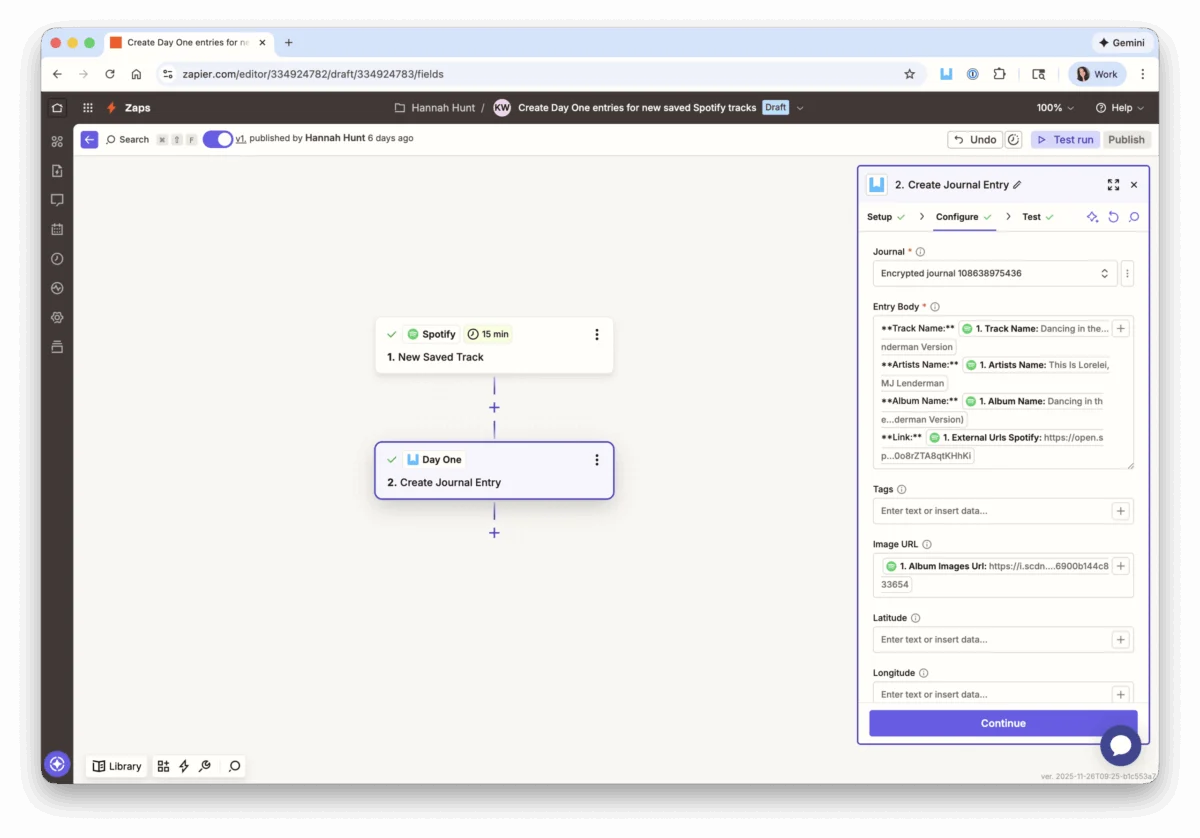
The CLI allows for the creation of shared logs for households or project teams. By using bot frameworks, users can automate the aggregation of status updates, household chores, or project milestones directly into a Day One journal, creating a centralized, searchable source of truth.
2. Private LLM Analysis
With the rise of local Large Language Models (LLMs), users are increasingly concerned about data privacy. The CLI provides a secure way to pipe local journal data into private, offline AI models. This allows users to perform "sentiment analysis over time" or "thematic clustering" of their life events without ever uploading their sensitive reflections to a third-party cloud provider.
3. Custom End-to-End Workflows
Because the CLI supports stdin/stdout piping, it integrates seamlessly with cron jobs and shell scripting. A user could, for instance, trigger a daily script that pulls weather data, stock market performance, or health metrics from a wearable device and automatically writes a formatted summary into a "Daily Metrics" journal within Day One.
Official Responses and Strategic Vision
In their official documentation and launch statement, the Day One team emphasized that this release is rooted in the philosophy of data ownership. "Everything you’ve put into Day One is yours to keep. It should also be yours to use," the company stated.
By publishing the code publicly, the team has taken a definitive stance on transparency. They recognize that when users connect their journals to AI models or third-party scripts, they are assuming responsibility for their data’s exposure. The open-source nature of the CLI serves as a safeguard, ensuring that users can audit exactly how their journal data is handled, stored, and transmitted.
Regarding the coexistence of the new CLI and existing tools, the company has provided clear guidance:
- Legacy vs. New: The new CLI and the legacy Mac CLI can coexist. Users should distinguish them by command names (
dayonevs.dayone-mac). - Device Limits: On the free tier, the CLI counts as an "active device." For subscribers of the Silver and Gold plans, the CLI can operate alongside mobile and desktop applications without hitting synchronization limitations.
Implications for the Journaling Ecosystem
The release of this CLI has profound implications for the future of personal knowledge management (PKM).
Shifting from "Log" to "Data"
Traditionally, journaling apps have been viewed as static diaries. By providing a CLI, Day One is reclassifying the journal as a dynamic, programmable data store. This shifts the user experience from passive writing to active, data-driven reflection.
The Rise of the "Reflective Engineer"
The emergence of this tool empowers a new archetype of user: the "Reflective Engineer." These individuals prioritize the intersection of software engineering and self-improvement. For them, the ability to query their past via SQL-like logic or automate the capture of their daily experiences is not just a feature—it is a requirement for maintaining a high-functioning digital life.
Privacy and the "Bring Your Own Model" Movement
Perhaps the most significant implication is the ability to leverage "Bring Your Own LLM" (BYOLLM) workflows. By allowing the CLI to feed journal data into user-selected models, Day One is effectively future-proofing its platform against the privacy concerns of centralized AI. As long as the user controls the CLI and the model, their journal remains entirely private, even while benefiting from the power of modern machine learning.
Future Outlook
While the CLI is currently in beta, the roadmap suggests a trajectory toward greater integration. The addition of "AI agent skills"—ready-made building blocks for coding agents—indicates that Day One intends to remain at the forefront of the automated journaling space.
For developers looking to get started, the installation process is straightforward:
- Ensure Node.js LTS is installed.
- Install via npm:
npm install -g @dayone/cli. - Authenticate:
dayone setup. - Sync:
dayone sync.
As the tool moves out of beta, the community expects further refinements in filtering, better documentation for large-scale data exports, and potentially more robust API endpoints for complex integrations. For now, the Day One CLI stands as a bold invitation to the developer community: to stop merely recording their lives and start engineering their personal history.
As the digital landscape becomes increasingly fragmented, tools that prioritize user autonomy and technical openness—like the Day One CLI—are poised to become the bedrock of the next generation of personal productivity software. Whether you are building a bot to log your team’s stand-ups or training a local LLM to uncover patterns in your four-year-old reflections, the barrier between your thoughts and your machine has officially been removed.